Sites and Hierarchies

APM enables you to create and work with multiple sites within one enterprise and one database. Sites are typically organized into a hierarchy that matches your company’s structural and reporting hierarchy.
You will use multiple sites in APM when:
Tip: The APM install database comes with Install Site, Division, and Plant sites already created. You can adjust this simple hierarchy as required, as well as review and change default settings for the sites.

What is a Site?

A site is the top asset in your physical asset hierarchy or a higher-level organizational structure used specifically to control how data is secured, viewed, and used between sites. For example, a site can be a plant, a division, or your company’s head office. You can have more than one site, and you can organize your sites into a hierarchy that matches your organization’s structural and reporting hierarchy. You can also control the functionality that is available for individual sites by deactivating licensed application modules in the site’s properties.
The site at the highest level covers the organization as a whole. Costs from all sites below it are summarized. At the lowest-level of the site hierarchy, sites represent actual offices or plants. These lowest-level sites contain the most data and use the majority of the enterprise asset management functionality. Assets (organizational, maintainable, component, and so on) are children usually only of the lowest-level sites.
Each site has an address, a currency, and a parent site. Sites themselves are also assets and appear in asset listings. You can open the asset record for a site. However, you will probably not need to view the asset record for a site.

What is the Enterprise?

The enterprise is an administrative function and your starting point in setting up APM. It is the location within APM where you will set up sites and place them in a hierarchy.
The enterprise also contains global settings and tools, such as asset hierarchy settings, site types, security profiles, GL accounts, and scheduled actions. It also lists the installed APM products and their activation statuses.

Site Hierarchies

If you are using multiple sites, you must select a top site and create child sites to form a site hierarchy. You can organize the hierarchy in the way that is most appropriate for your organization’s size and structure. For example, you can have a simple hierarchy with a top site and a few child sites. Or you can choose a more complex hierarchy with multiple levels. If you have only one location and maintenance organization, you can choose not to have a site hierarchy at all.
You should define your sites at the levels you use to partition your data. For example, if you want to view a cost summary of two separate operating locations, define a higher-level site in which to capture the consolidated costs. If you wish to share certain objects (for example, templates), they need to be owned at a higher-level site.

Simple Site Hierarchy

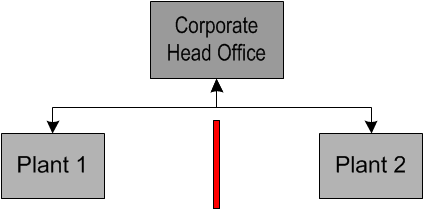
You might need a simple site hierarchy if, for example, you have two plants reporting into one corporate head office. Your hierarchy of sites could look like the following example.
Data owned at the top site (Corporate Head Office) is visible to, and can be used by, all sites. Data owned by Plant 1 is not visible to Plant 2, and vice versa.
For each level in the hierarchy, set up a site type. In the above example, the Head Office site type owns administrative settings (or value lists) and could also own employees, suppliers, purchase orders, resources, standard documents, and templates. Plants most likely own assets, work requests, work orders, requisitions, schedules, standard tasks, standard jobs, PM routes, and warehouses.

Complex Site Hierarchy

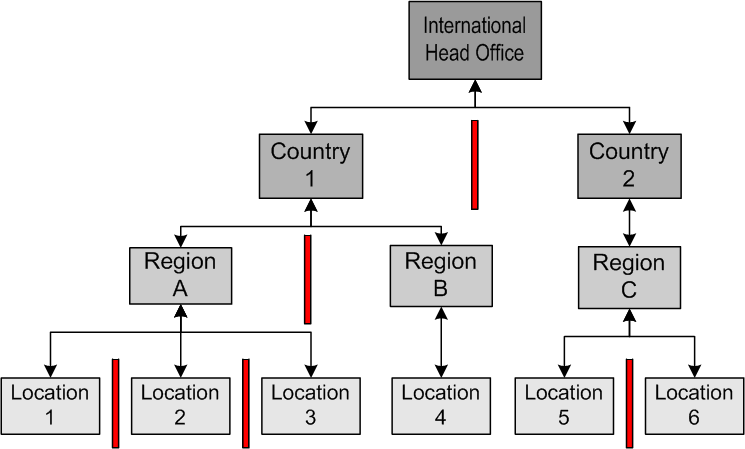
You might need a very complex site hierarchy if, for example, you have a head office that oversees operations in several countries and several locations within each country organized into geographical regions. Your hierarchy of sites could look like the following example.
In this example:
For each level in the hierarchy, set up a site type. In the above example, the Head Office site type owns administrative settings and value lists. This site type might also own employees, suppliers, purchase orders, resources, standard documents, and templates. Country site types might own employees and templates used only in the regions within a country. Regions might own warehouses that are shared between locations within a region. Locations are the actual operating sites where the majority of employees work. Therefore, the location site type owns employees, assets, work requests, work orders, requisitions, schedules, standard tasks, standard jobs, and PM routes.
If you manage three out of four locations in Country 1 (the fourth managed independently), then it is wise to set up Region sites at a higher level. This allows you to view the costs and manage the maintenance work for only your sites. Yet at the Country 1 site, data from all four locations is summarized. From the Head Office site, you can view the total costs, work backlog, and so on of all the descendant sites (the entire organization).

TOP

Site Hierarchies and Application Modules

Each APM product has one or more modules. You can enable (and disable) modules for individual sites. This allows you to control what users see on a site. For example, a customer might have these modules to work with: Reliability Strategy Development, Implementation and Performance Management, Advanced Performance Indicators, and Asset Health. One of the customer’s sites is only starting their implementation, and they wish to begin by performing Strategy Development analysis of key assets. The other modules can be turned off for this site, thereby keeping the look and feel of APM appropriate for users. When ready, the other modules can be turned on for the site.
If you have licensed the Enterprise Asset Management (EAM) module, you can turn it off on individual sites. In a site hierarchy that contains both EAM and non-EAM sites in the same branches, if you are using a central Purchasing site at a higher level, create different site types for EAM and non-EAM sites with different object ownership rules. The non-EAM site type should not include permission to own purchasing objects (purchase orders, RFQs, invoices, contracts, suppliers, and supplier resources). This will prevent purchase orders, for example, from being created at sites that do not support them.