|
Setting up Work Priorities
You can have APM calculate the completion date for work requests based on their priorities. The work priority sets the time interval in which the work should be completed. If the Enforce option is enabled on the priority, the requested completion date of the work request cannot be changed to later than the calculated date. When AWEIS is active, the work priority is used to calculate (and enforce, if appropriate) the End before date on the request for work.Tip: To view the requested completion date on an open work request, open the Work Request window, select the Properties view, General tab, and then the Details tab. On the Work Order Task window, you will find it in the Planning view, Source tab, Requester tab.To Set up a Work Priority
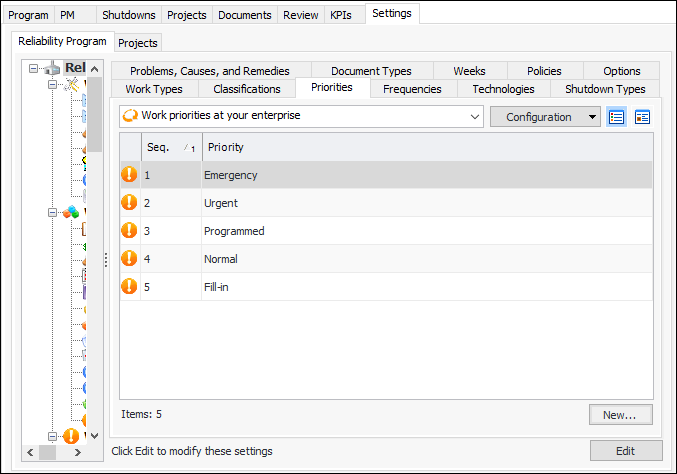
1. From the Site window, select the Reliability Program view and the Settings tab. Select the Reliability Program tab and the Reliability program settings node in the tree.Tip: You can also select the Administration menu and Reliability Program Settings. The Reliability Program Settings dialog appears.
2. Select the Priorities tab. This tab shows a list of the current work priorities. For example:
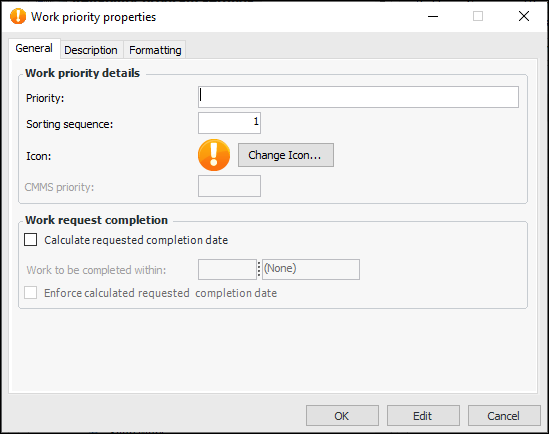
3. Click New. The Work Priority Properties dialog appears.
5.
Enter the value and unit of measure in the Work to be completed within fields, for example, “6 weeks”.
7. Select the Description tab to add more information.
8. On the Formatting tab, you can select a font, text color, and back color to distinguish this work priority in table rows.Note: To have the formatting appear in a table’s rows, open the table configuration, select the Appearance tab, then the Grid tab and Row Formatting tab. Select the join path to the priority’s FontAndColorControl attribute.
9. Click OK to close the dialog.