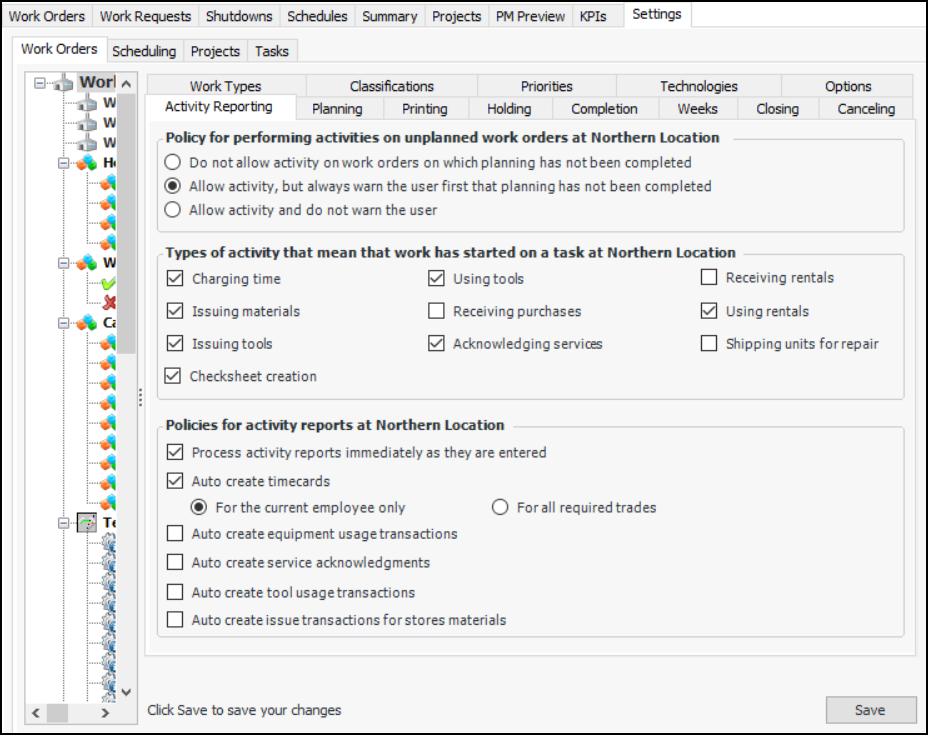
Setting Activity Reporting Options

When users report activity or close work orders, there are several types of transactions and other information that might be entered. You can control the types of transactions and information that can be included on the Report Activity dialog. For example, if your organization does not track tool and equipment rentals, you might want to remove that tab from the dialogs.
Removing unused transactions and information from the report activity dialog can improve system performance when closing or reporting activity for large numbers of work orders and tasks.
You can set the policy for performing activities on work orders that have not been marked as planned. For more information, see Unplanned Work Policy. You can also set the policy for processing activity reports.

To Set up Work Order Reporting Options

1.
From the Site window, select the Work Management view and the Settings tab. Select the Work Orders tab and the Work management settings node in the tree.
Tip: You can also select the Administration menu and then Work Management Settings. The Work Management Settings dialog appears.
2.
Select the Activity Reporting tab and click Edit.
 
3.
4.
5.