
Setting Numbering Formats for Work Documents

Document numbering settings create the alpha-numeric identifiers that distinguish one document from another (for example, work orders). Within each site, every document must have a unique identifier. If necessary, you can enter a site-specific prefix or suffix to a type of document to ensure that their numbers are unique throughout the enterprise.
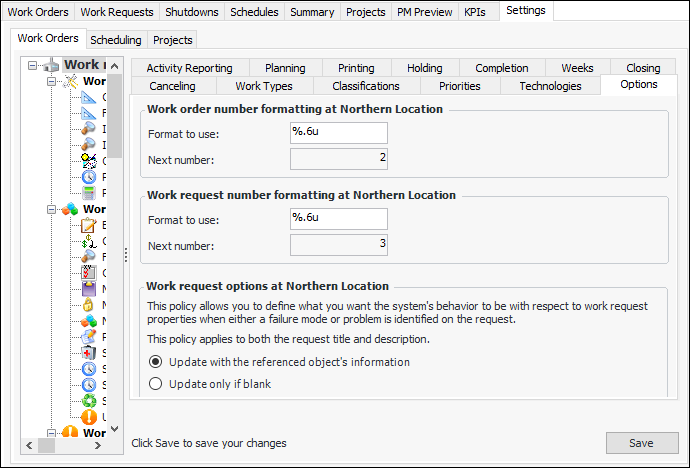
In work order settings, you can set the formats to use for work order and work request numbers. You can also see the numbers that will be assigned to the next new work order and request.

To Set Numbering Formats for Work Documents
1.
From the Site window, select the Work Management view and the Settings tab. Select the Work Orders tab and the Work management settings node in the tree.
Tip: You can also select the Administration menu and then Work Management Settings. The Work Management Settings dialog appears.
2.
Select the Options tab.
3.
Click Edit to modify the site settings. The Edit button is replaced by the Save button.
4.
For example, a format that says “%.6u” would generate six-digit numbers padded with zeros: 001234.
% indicates the start of the number definition.
.6 indicates that the numbers should have six digits. Numbers with less than six digits will be padded with zeros.
u indicates that the number is an unsigned integer (that is, it cannot be a negative number).
5.
Click Save.