
|
Setting up Safety Provision Levels
To Set up a Safety Provision Level
1. On the site’s Safety Management view, select the Settings tab, and the Safety Management Settings node in the tree.Tip: You can also select the site’s Administration menu and then Safety Management. The Safety Management Settings dialog appears.
2. Select the Provision Levels tab. This tab shows the provision levels defined for the site and below.
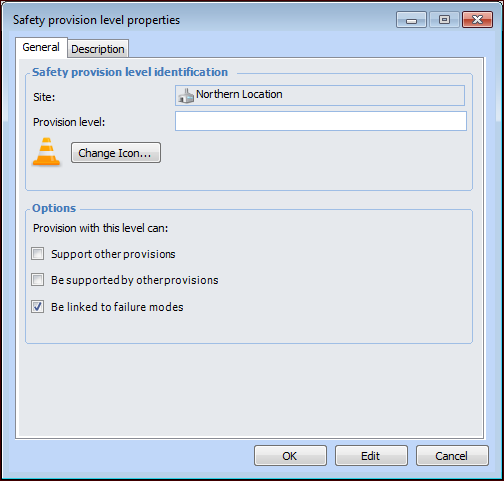
3. Click New. The Safety Provision Level Properties dialog appears.
5. To change the provision level’s identifying graphic, click Change Icon, select another graphic, and click OK.
• Support other provisions – Provisions with this level can be selected to support other provisions
• Be supported by other provisions – Provisions with this level can have supporting provisions
• Be linked to failure modes – Provisions with this level can be selected on SIF or HAZOP failure modes to reduce their calculated risk levels
7. On the Description tab, provide additional information about the provision level.
8. Click OK. The provision level is added to the table.