Setting up Problem Categories

A problem is a site category that describes common problems on assets of certain types, such as “lubrication failure.” Using problem categories can simplify the analysis of equipment failures. Problem categories can be linked to Cause and Remedy categories.
You can create problem categories to simplify the analysis of equipment failures. When you develop problem categories, define the common problems for each type of asset at a level of detail that makes analysis possible.
The value of problem categories is not in identifying every single cause of failure but rather in identifying the types of failure so that the maintenance engineers can work on the areas where the most benefit will be gained. For example, you could keep the problems at a high level such as “stopped” or “performing below design,” grouping problems into broad categories and keeping the remedies general. Within the high-level problem, you can create categories such as “lubrication failure” where all lubrication failures can be analyzed and further grouped into “lack of lubrication,” “incorrect lubrication,” and “lubrication breakdown.”
Problem categories can be linked to asset types and causes. Causes, in turn, can also be linked to remedies.

To Set up Problem Categories

1.
From the Site window, select the Reliability Program view and the Settings tab. Select the Reliability Program tab and the Reliability program settings node in the tree.
Tip: You can also select the Administration menu and Reliability Program Settings. The Reliability Program Settings dialog appears.
2.
Select the Problems, Causes, and Remedies tab, and then the Problems tab. This tab shows a list of the current problem categories.
3.
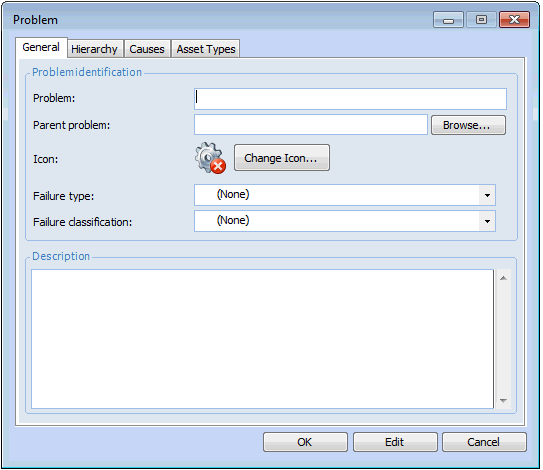
Click New. The Problem dialog appears.
4.
On the General tab, enter the following:
Enter a parent problem or click Browse to select a parent problem.
5.
Select the Causes tab. To select the possible causes of this problem, click Browse. Select one or more causes and click OK.
Tip: You can create a new cause by right-clicking in the table and selecting New. For detailed instructions, see Setting up Causes.
6.
Select the Asset Types tab. To select the types of assets that this problem applies to, click Browse. Highlight one or more asset types and click OK.
7.
8.
Repeat steps 3 to 7 for all problem categories.