
Setting Default Values for Inspection Routes

A dynamic inspection route is defined on a standard task and comprises a list of assets (ordered in walk-around sequence) and a set of criteria for including the assets’ indicators. When a list of indicators to read is generated using the standard task, indicators with properties that match the criteria are included.
In reliability program settings, you can set default values for inspection routes. When a standard task is created, these values are copied to the route, where the person setting up the route can change them as required.
Inspection routes settings are:

To Set Default Values for Inspection Routes
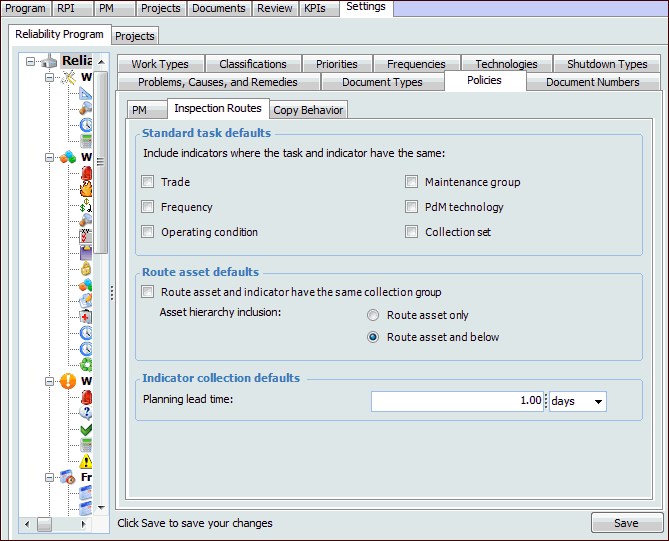
1.
From the Site window, select the Reliability Program view and the Settings tab. Select the Reliability Program tab and the Reliability program settings node in the tree.
Tip: You can also select the Administration menu and Reliability Program Settings. The Reliability Program Settings dialog appears.
2.
Select the Policies tab and then the Inspection Routes tab.
3.
Click Edit.
4.
When Trade is selected, route assets’ indicators that have matching trades are included in the list of indicators to read.
When Expected frequency is selected, route assets’ indicators that have matching frequencies are included in the list of indicators to read.
When Asset operating condition is selected, route assets’ indicators that have matching operating conditions are included in the list of indicators to read.
When Maintenance group is selected, route assets’ indicators that have matching maintenance groups are included in the list of indicators to read.
When PdM technology is selected, route assets’ indicators that have matching technologies are included in the list of indicators to read.
When Collection set is selected, route assets’ indicators that have matching collection sets are included in the list of indicators to read.
5.
6.
7.
Click Save. New standard tasks will have the defaults you selected.