Adding Values for Indicator Subtypes

An indicator subtype is a means of recording additional information about a type of APM indicator used in survey inspections. When a reading is taken for an indicator that supports subtypes and measurement points, you can record information about the subtype onto the reading. Examples of some measurement point subtypes included with APM include anode, berm, marine growth, and soil type. Examples of values for soil type could include bedrock, clay, pebbles, and sand.
The APM base product ships with nine value lists that you can control, which are used in recording information for measurement points and measurement point readings.
Note: Custom subtypes can be created for measurement points to support surveys specific to other types of inspections, such as pipelines, railways, and roads and so on. For more information, see Creating Indicator Subtypes.
Note: To record subtype information for a single indicator reading, you must create a single fixed measurement point on the indicator and enter subtype information on the measurement point reading. This also allows you to export checksheets to Excel that have a separate worksheet for each subtype on the reading.
This topic describes how to add values to attributes collected on measurement subtypes.

To Add Values for Indicator Subtypes

1.
From the Site window, select the Inspection Management view, the Settings tab, and then the Subtypes tab. Select the Subtype Settings node in the tree.
Tip: You can also click the Administration menu, Inspection Management Settings, and then Indicator Subtypes. The Indicator Subtype Settings window appears.
2.
3.
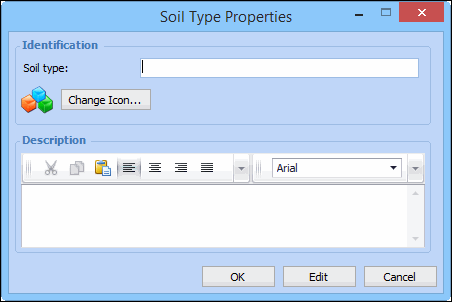
To add a new value, click New, or to edit an existing value, double-click it. The value list’s dialog appears. For example:
4.
5.
When you are finished, click OK. The value appears in the list.
6.
Repeat steps 1 to 5 for each value that you want to add.