|
Setting up Manufacturer Rules for Construction Forms
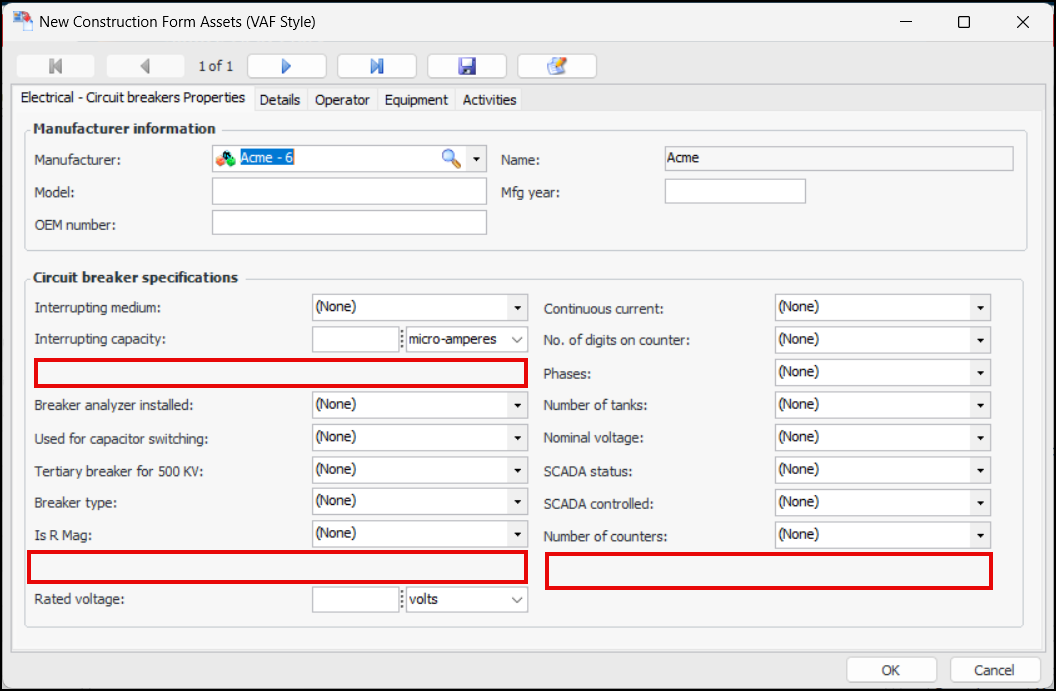
Manufacturer rules make it possible to remove unnecessary properties from construction forms, making them easier for users to complete. For example, in this form for a circuit breaker, the Nameplate gas weight, Metal clad, and Number of gauges properties are invisible. They could also be shown as read-only (irrelevant visible).To Set up Rules on Manufacturers
1. In the Site window, select the Construction Management view and the Settings tab. Select the Construction Management Settings node in the tree.Tip: You can also select the Administration menu and then Construction Management Settings. The Construction Management Settings dialog appears.
2. Select the Manufacturers tab. This tab lists all of the manufacturers in the enterprise.
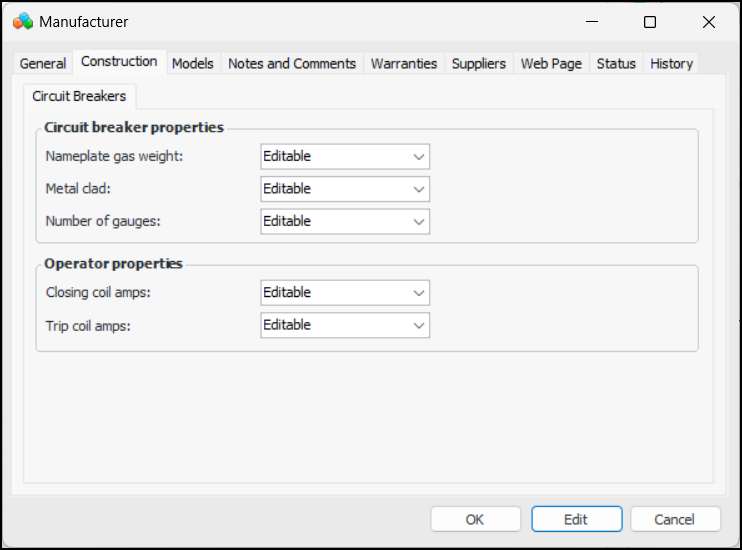
5. Select the Construction tab.
6. On the Circuit Breakers tab, select values for circuit breaker properties:
• Nameplate gas weight – Editable (default), Irrelevant invisible, or Irrelevant visible
• Metal clad – Editable (default), Irrelevant invisible, or Irrelevant visible
• Number of gauges – Editable (default), Irrelevant invisible, or Irrelevant visible
• Closing coil amps – Editable (default), Irrelevant invisible, or Irrelevant visible
• Trip coil amps – Editable (default), Irrelevant invisible, or Irrelevant visible
8. Click OK.