
Setting up Criticalities for Anomaly Risk Assessment
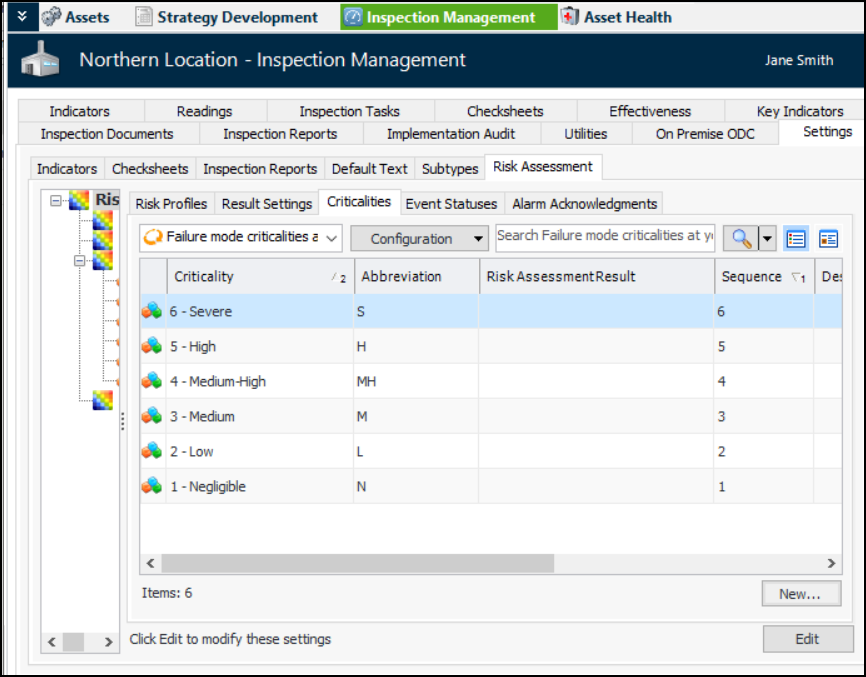
After you have set up the anomaly risk assessment results, you can assign them to the criticalities that identify the outcome of risk assessment.
This topic explains how to modify criticalities. For information about creating them, see Setting up Failure Mode Criticalities.

To Set up Criticalities for Anomaly Risk Assessment
1.
From the Site window, select the Inspection Management view and the Settings tab. Select the Risk Assessment tab and the Risk Assessment Management Settings node in the tree.
Tip: You can also select the Performance Management or Work Management view and then the Settings tab.
2.
Select the Criticalities tab:
The tab lists the failure mode criticalites for the site and above. You can use the list at the bottom of the tab to display settings for the site and below or just this site.
3.
4.
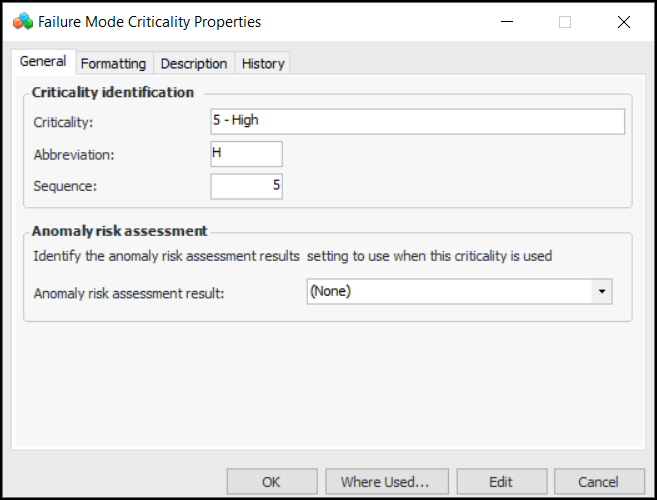
In the Anomaly risk assessment result list, select the appropriate result.
5.
Click OK. The Risk Assessment Result column in the table displays your selection.