
Setting Relative Risk and Asset Priority Thresholds
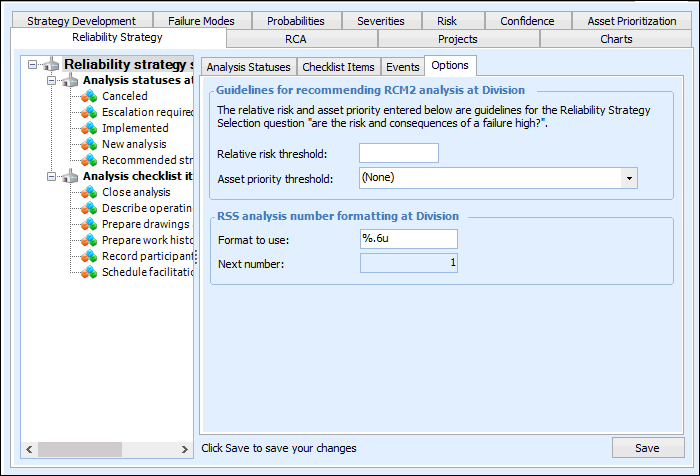
The asset’s prioritization analysis determines its priority: a number that represents the seriousness of the consequences of asset failure. The analysis also identifies the asset’s relative risk: a number that indicates the balance between the seriousness of failure consequences and the probability that failure will occur. When prioritization settings have been defined, stakeholders decide the thresholds that determine when relative risk and consequence priority are tolerable. Scores below the thresholds are considered tolerable.
The thresholds are used for reliability strategy selection. The analysis begins by assessing whether the asset’s relative risk is tolerable. If the performance is not satisfactory or the relative risk is too high, the analysis proceeds with the evaluation of the consequence priority. If the consequence priority number of the asset or any of its components is not tolerable, the recommended strategy for the asset is to conduct an RCM2 analysis.
This topic explains how to set the thresholds for relative risk and consequence priority for use in reliability strategy analyses.

To Set Relative Risk and Asset Priority Thresholds

1.
On the site’s Strategy Development view, Settings tab, select the Reliability Strategy tab.
Tip: You can also select the site’s Administration menu, Strategy Development Settings, and then Reliability Strategy. The RSS Settings dialog appears.
2.
Select the Options tab.
3.
Click Edit to modify the site settings. The Edit button is replaced by the Save button.
4.
In the Relative risk threshold box, enter the threshold number. Assets with relative risks higher than this number are considered for RCM2 analysis.
5.
In the Asset priority threshold list, select the threshold priority. Assets with priorities higher than this number are considered for RCM2 analysis.
6.