Setting up Checklist Items

An analysis checklist is a list of “things to do” to remind the team of the steps they need to consider when performing the analysis. For each item that you add to APM settings, you can specify the varieties of analysis it applies to, identify it with an icon, and provide a description.
When recording an analysis, you can mark analysis checklist items as “Performed” and provide comments for them. APM records the employee who checked off the item, the date, and time. The analysis team can view the status of checklist items in the analysis window, Properties view, Checklist tab.
This topic explains how to add checklist items in APM.

To Set up Checklist Items

1.
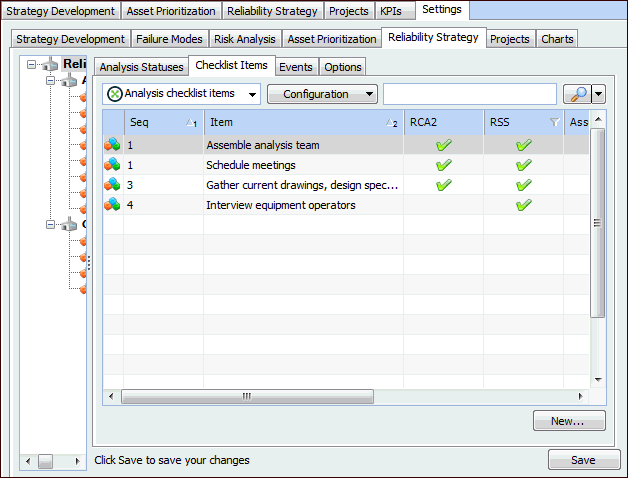
On the site’s Strategy Development view, Settings tab, select the Reliability Strategy tab.
Tip: You can also select the site’s Administration menu, Strategy Development Settings, and then Reliability Strategy. The RSS Settings dialog appears.
2.
Select the Checklist Items tab. For example:
3.
4.
5.
Note: When items with the same sequence number apply to an analysis type, they are listed in the order in which they were added to APM settings.
6.
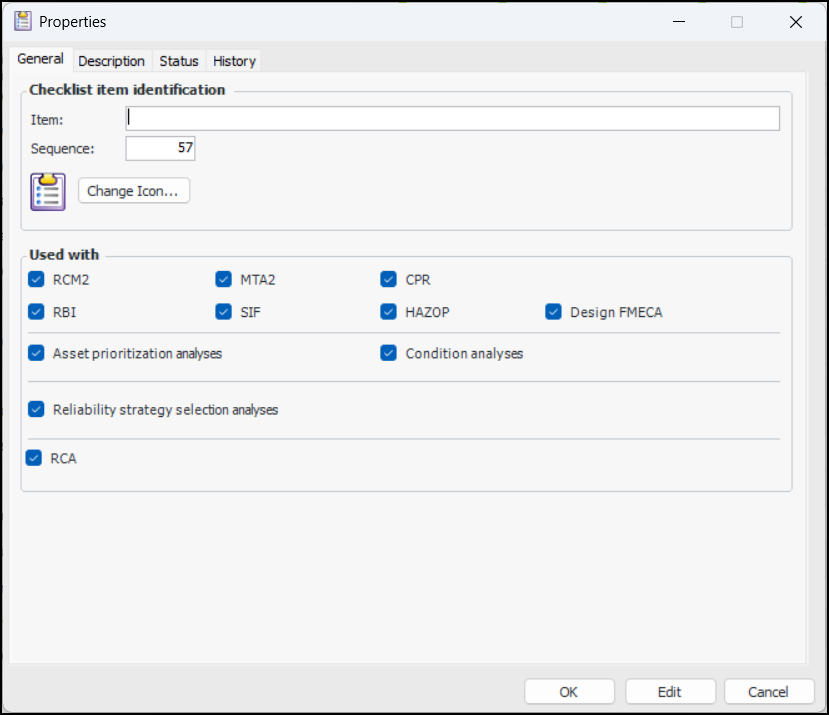
To change the icon displayed for this item, click Change Icon, select an image and click OK.
7.
In the Used with area, select the types of analysis to which the item applies.
8.
On the Description tab, you can add information about the item.
9.
Click OK. The dialog closes and the item is added to the table.