Setting up Failure Severities for RCA

Failure severities communicate the seriousness of a failure’s impact. APM supports three levels of severity: potential, partial, and full. You can define severities that incorporate these values, provide ranking numbers, and descriptions for them. You can also give each severity a seriousness ranking to be used to evaluate a failure’s suitability for RCA.

To Set up Failure Severities for RCA

1.
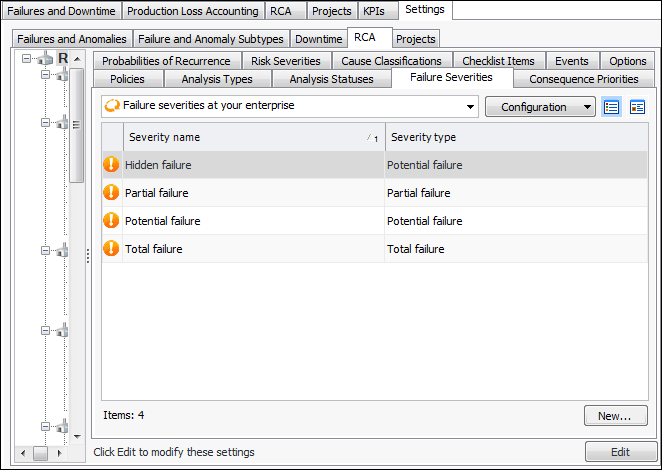
From the Site window, select the Performance Management view, Settings tab. Select the RCA tab and the RCA settings node in the tree.
Tip: You can also click the Administration menu, Performance Management Settings, and then RCA. The RCA Management Settings dialog appears.
2.
Select the Failure Severities tab. The tab lists any severities created for your enterprise.
3.
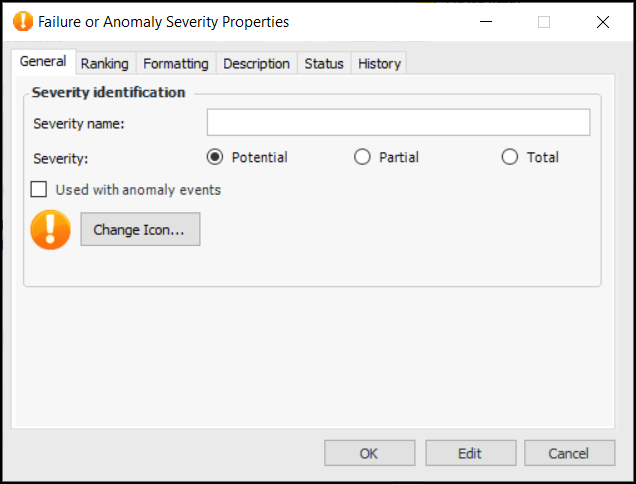
Click New. The Failure or Anomaly Severity Properties dialog appears.
4.
5.
Potential: a condition that has been noticed that would result in an actual failure if the problem is not resolved. The actual failure has not yet occurred. Potential failures are normally reported as the result of an indicator reading that has raised a warning alarm against the asset.
Partial: the asset’s performance has decreased to a point where it is no longer performing one of its functions at the specified levels. The asset is still functioning.
Total: the asset’s performance has decreased to a point where the asset is no longer performing at its required level. The asset has completely failed.
6.
If available, you can click Used with anomaly events so that the severity is available in anomaly events as an anomaly severity.
7.
You can select a different icon by clicking Change Icon and selecting another graphic.
8.
On the Ranking tab, you can rank the severity relative to others by assigning it a number. Use smaller numbers for lower severities and larger numbers for more serious severities.
9.
In the RCA seriousness box, enter a positive number that indicates the seriousness of the failure relative to other severities. Larger numbers have greater severity. APM multiplies the severity’s seriousness score by the numbers assigned to its consequence priority and probability of recurrence to calculate the failure’s criticality index. In turn, the criticality index determines the failure’s suitability for root cause analysis.
10.
Select the Formatting tab if you wish to modify how this severity is shown in table rows. You can change the font, text color, and back color.
11.
Select the Description tab to provide more information about the type of severity.
Tip: To have the formatting appear in a table’s rows, open the table configuration, select the Appearance tab, then the Grid tab and Row Formatting tab. Select the join path to the severity’s FontAndColorControl attribute.
12.
Click OK to save the severity and close the dialog.