Setting up Cause Classifications for RCA

An optional step in the analysis is to evaluate causes in terms of immediate and basic causes and lack of control. For each of these, the analysis team can provide descriptions and select causal factors.
Cause classifications are used to identify causal factors. For example, immediate causes could have the classifications Substandard Conditions and Substandard Acts. Each classification identifies the factors that contribute to it. For example, Substandard Conditions could include one or more of the following:
This topic explains how to set up cause classifications in RCA settings.

To Set up Cause Classifications for RCA
1.
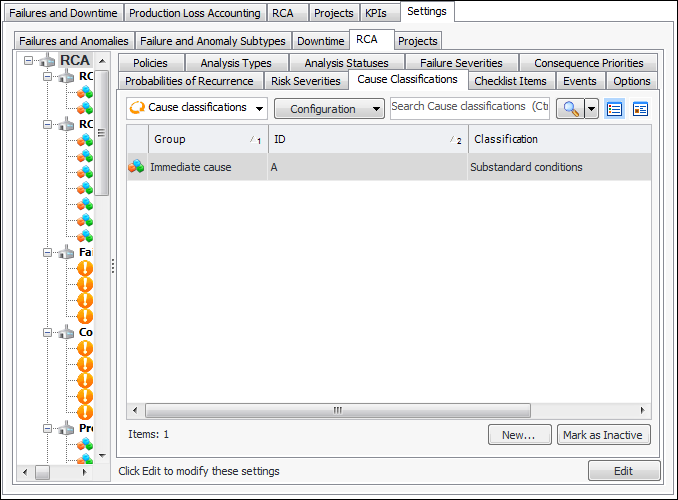
From the Site window, select the Performance Management view, Settings tab. Select the RCA tab and the RCA settings node in the tree.
Tip: You can also click the Administration menu, Performance Management Settings, and then RCA. The RCA Management Settings dialog appears.
2.
Select the Cause Classifications tab. This tab lists any values that have been defined.
Tip: While you are developing classifications, you can mark individual classifications as inactive until it is ready to use.
3.
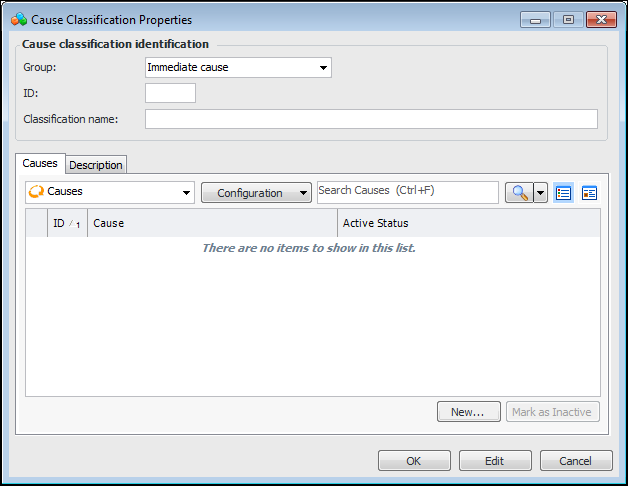
Click New. The Cause Classification Properties dialog appears.
4.
Immediate cause – Immediate causes are the circumstances that immediately preceded the event and can usually be seen or sensed. For example, if the incident is an oil spill, the immediate cause could be a break in the sealing.
Basic cause – Basic causes are the real causes behind the immediate causes: the reasons why the substandard acts and condition occurred. In the case of an oil spill caused by a broken seal, the basic causes could be that the wrong type of sealing was used, the sealing had a design flaw, or it might have been installed incorrectly.
Lack of control – Lack of control means insufficient oversight of the activities from design to planning to operation. Control is achieved through standards and procedures for operation, maintenance, and acquisition. If an oil spill occurred because of the incorrect installation of sealing, the lack of control cause could be related to inadequate procedures for checking after maintenance.
5.
Select the Description tab to provide more information.
6.
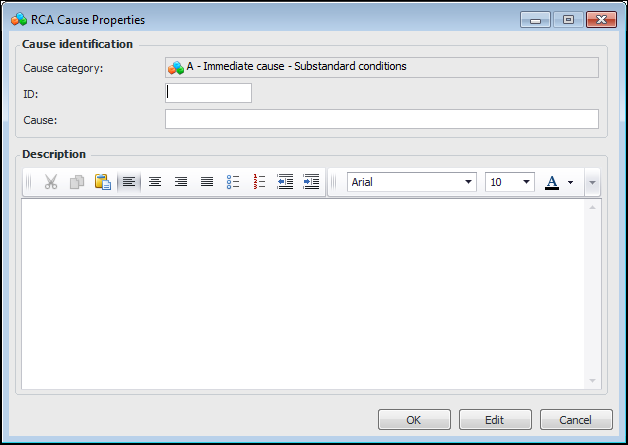
For each sub-classification, click New. The RCA Cause Properties dialog appears:
The cause category comprises the classification ID, group, and classification name.
7.
8.
Click OK to close the RCA Cause Properties dialog.
9.
When you have finished adding causal factors, click OK to close the Cause Classification Properties dialog.