Setting up Severities

You can set up severities for use in RBI, MTA2, RCM2, and SIF analyses when risk analysis is warranted for the asset. They are also used to evaluate a failure’s suitability for RCA. Severities are also used in risk assessments in alarm acknowledgments and requests for work.
Failure severity identifies the consequences when a failure occurs. It has the category Health and Safety, Economic, Environmental, or Reputation and is usually described as high, medium, low, or negligible. An impact statement, alternate statement, evaluation question, severity value, and safety risk level are associated with each severity. The larger the number, the more severe the safety risk.
The severity value is used to select the failure mode’s consequence priority or to calculate weighted severity, depending on how failure mode risk is assessed.
Each severity can be assigned to one or more score sets. In each set, the severity is assigned a score. The scores are used to rank the severity of failure modes. The larger the number, the higher the severity.
Individual economic severities are assigned economic impact amounts, alternate impacts, economic ranges and alternate ranges.
The severities must exist before evaluation forms for health and safety, economic, environmental, and reputation consequences can be set up or used.
This topic provides background information and explains how to create severities. It covers:

Standard Severities and Security Values Provided by APM

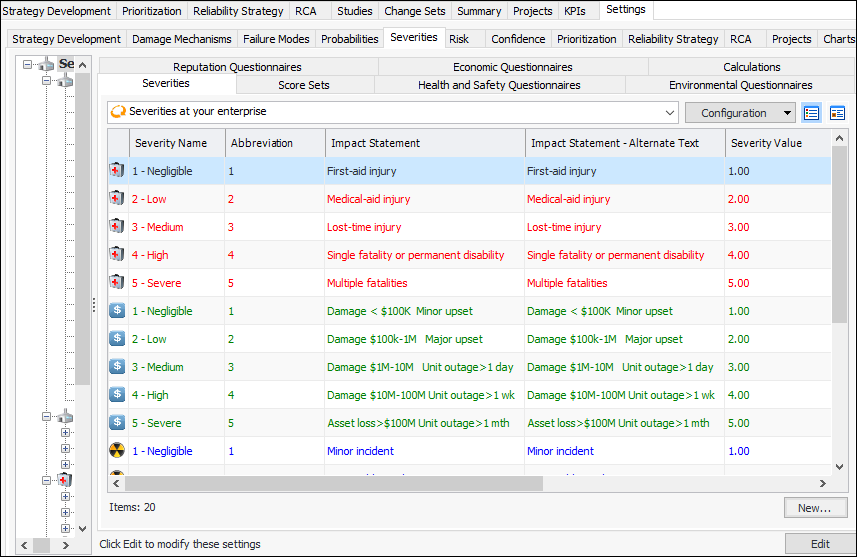
APM comes with the following severities and severity values for health and safety, economic, environmental, and reputation consequence categories:
You can add new severities for your organization and edit the existing severities. For example, edit the existing severities’ impact statements.
Note: APM risk matrices support up to eight severities in each category. For example, if you are setting up a matrix with five probabilities and six consequences, the matrix size will be 5x6. You will want to create one additional severity in each category to cover the sixth consequence. See Setting up Risk Matrices.

Economic Impact and Economic Ranges

Each severity definition is assigned an economic impact and one or two alternates, which reflect the cost that the consequence can incur. The amount is shown in the site’s currency.
Economic impact is always used to indicate cost for health and safety, environmental, and reputation severities. However, economic severities are usually assigned an economic range, as well as one or two alternate ranges.
Economic ranges identify the starting point for the severity’s range of values when a worksheet is used to evaluate the total cost of the consequence. For example, imagine the following economic severities:
An economic evaluation with a total cost of $2,575 will have a severity of “Low”. A total cost of $7,000 will have a severity of “Medium”, and so on.
APM presents an economic severity worksheet in a pop-up questionnaire. When the user clicks an economic severity in the risk matrix (rather than using a worksheet) or when the evaluation is presented in an embedded form, economic impact is used (rather than economic range).
You can define alternate economic impacts and ranges for an economic severity to be used with different types of risk assessments. Select the economic impact and range to use in the analysis type’s economic risk options. When you select the first alternate, for example, the first alternate impact and the first alternate range are used.

Alternate Values

You can set up scoring schemes for different types of risk assessments that use severity consequence evaluations. You can specify one alternate impact statement and up to two alternate economic impacts. For economic severities, you can set up two alternate economic ranges.
When setting risk options (on the analysis itself or on the analysis type or asset type), you can choose the score sets to be used for the health and safety, environmental, and reputation questionnaires. You can also choose the economic impact to use with each of these types of questionnaire. Entries in the damage mechanisms library (RBI only) can also specify evaluation score sets to use, and these settings take precedence over those on the analysis.

To Create a Severity

1.
On the site’s Strategy Development view, select the Settings tab, the Severities tab, and the Severities settings node in the tree.
Tip: You can also select the site’s Administration menu, Strategy Development Settings, Risk Analysis and then Severities. The Strategy Development - Severities Settings dialog appears.
2.
Select the Severities tab.
3.
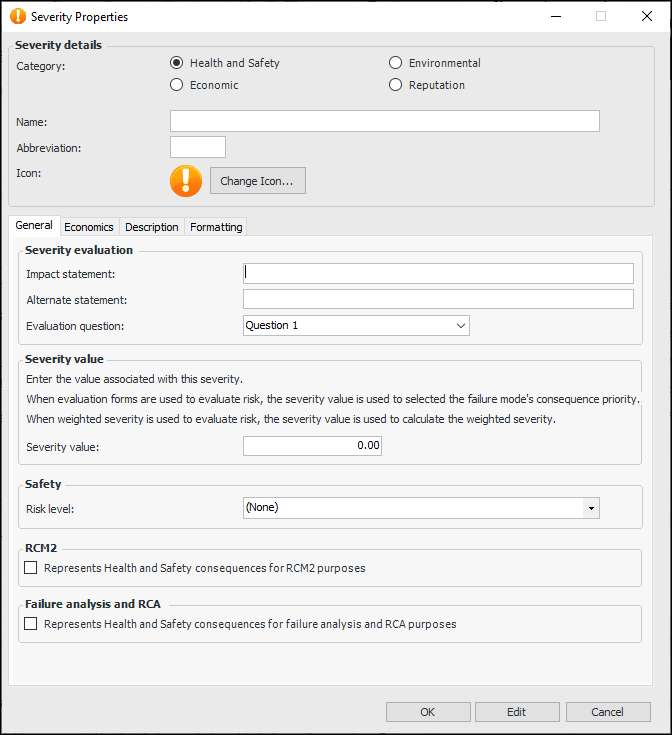
Click New. The Severity dialog appears.
4.
5.
6.
7.
To change the icon that identifies the severity, click Change Icon, select a different graphic, and click OK.
8.
On the General tab, provide an impact statement, for example, “Slight injury” or “Major damage”.
9.
10.
11.
12.
13.
If the severity is to be used in RCM2 evaluations, select Represents consequences for RCM2 purposes.
Tip: Select this option for severities with higher impact. When the analysis team completes a failure mode risk assessment, APM considers the health and safety, then the environmental, and then the economic consequence to answer the related questions in the RCM2 evaluation.
14.
15.
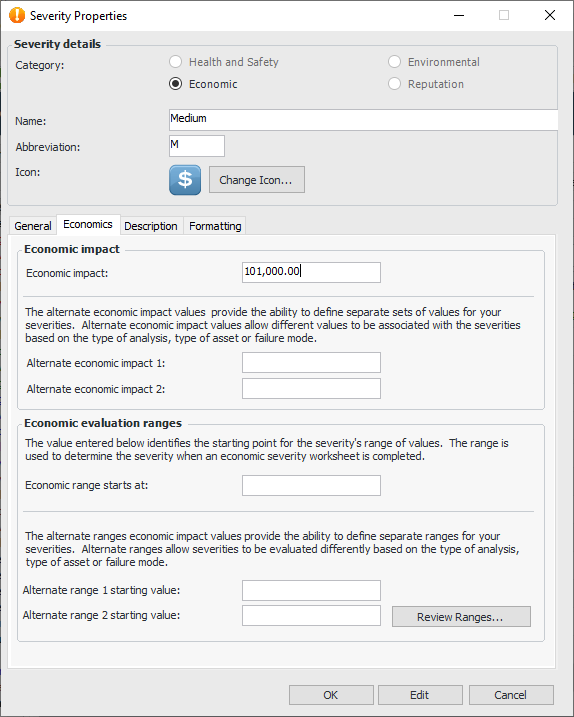
Select the Economics tab. If you are creating an economic severity, the Economic evaluation ranges area is available on this tab. For example:
16.
Tip: Click Review Ranges to see the severity names, values, starting values, economic impacts, and alternates for all of the severities that have been defined for the site.
17.
On the Description tab, provide information about the severity.
18.
On the Formatting tab, you can select the font, text color, and background color for the severity when it appears in table configurations and charts.
19.
Click OK. The severity is added to the table.