Setting up Injury Severities

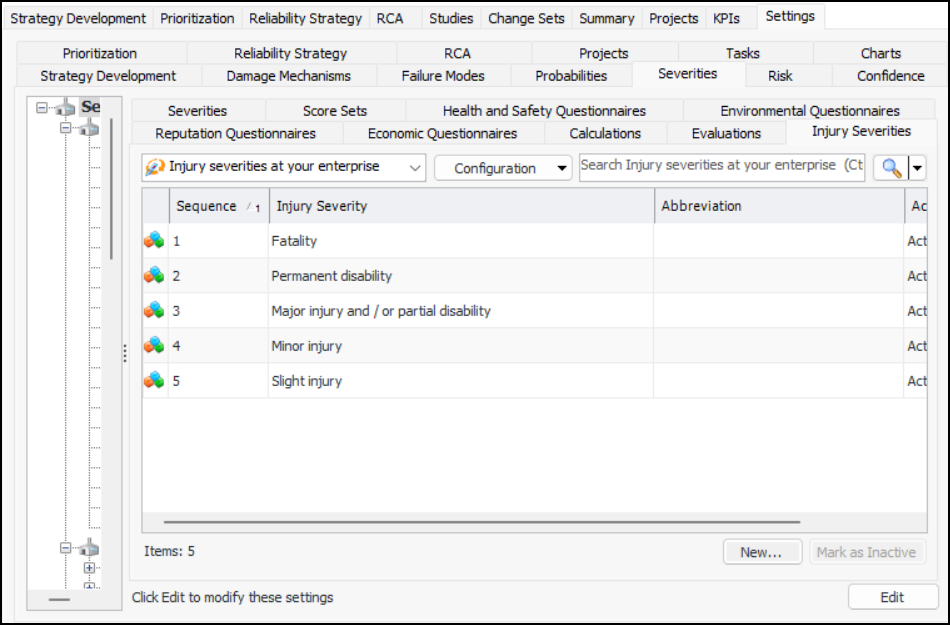
Injury severities are used in the calculation of lost time due to injury in evaluations of the health and safety consequences of failure. The values are used in lost time lookup tables. Examples of injury severities are:
For more information, see Setting up Consequence Severity Evaluations to use Lookup Tables.

To Set up an Injury Severity

1.
On the site’s Strategy Development view, select the Settings tab, the Severities tab, and the Severities settings node in the tree.
Tip: You can also select the site’s Administration menu, Strategy Development Settings, Risk Analysis and then Severities. The Strategy Development - Severities Settings dialog appears.
2.
Select the Injury Severities tab.
You can mark a severity as inactive until it is ready to be used. Select the value in the table and click Mark as Inactive. The Mark as Inactive/Active dialog appears, where you can enter a comment. When you click OK, a confirmation message appears. Click OK. When you are ready, click Mark as Active to make the value available.
3.
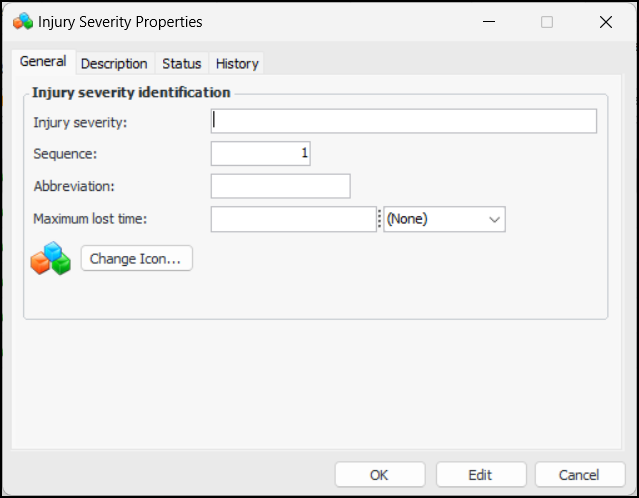
Click New. The Injury Severity Properties dialog appears.
4.
5.
6.
7.
8.
To change the image that represents this value in lists, click Change Icon, select a different graphic, and click OK.
9.
Select the Description tab to provide more information.
The Status tab shows the active status of the value.
The History tab shows the personnel who created and last updated the value, as well as the dates.