Setting up Likelihood of Failure Values

Performing risk analysis involves determining the probability that a failure mode will occur. The probability evaluation can be based on the likelihood of failure value and a demand scenario. The likelihood of failure indicates how often the asset, for example, a safety device has been needed in the past. To set up this type of evaluation, you must create likelihood of failure values, for example, “Has happened more that once per year at the location” or “Heard of in the industry”.
This topic explains how to create likelihood of failure values.

To Set up Likelihood of Failure Values
1.
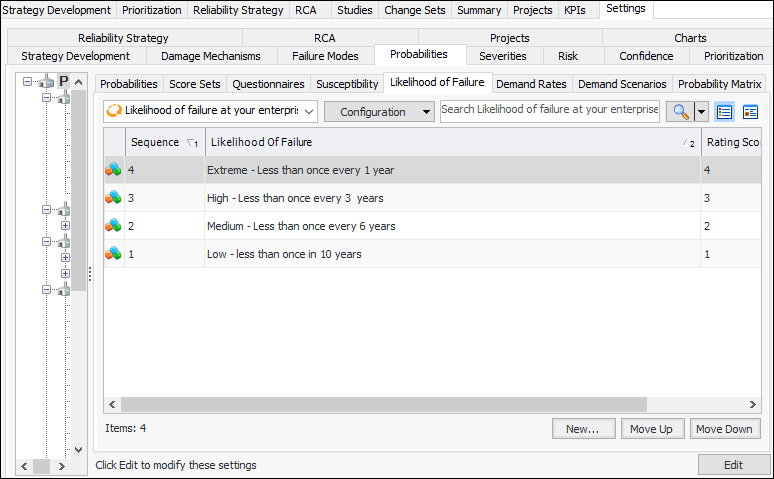
From the Site window, select the Strategy Development view, Settings tab and then the Probabilities tab. Select the Probability of Failure Settings node in the tree.
Tip: You can also select the Administration menu, Strategy Development Settings, Risk Analysis, and then Probabilities. The Strategy Development - Probability of Failure Settings dialog appears.
2.
Select the Likelihood of Failure tab.
3.
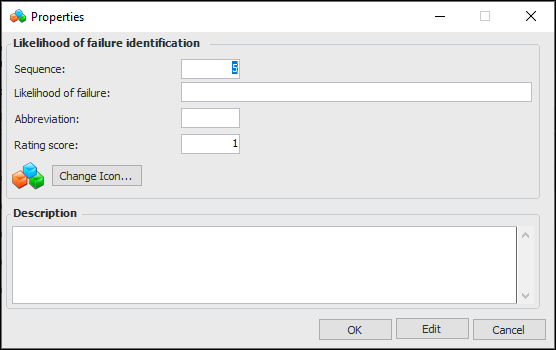
Click New. The Properties dialog appears.
4.
The sequence number determines the order in which values are listed in the Likelihood of Failure tab. You can change the default number here, or you can use the Move Up and Move Down buttons on the tab to change the sequence numbers of all values.
5.
6.
7.
8.
Click OK to save the value and close the dialog.