Setting up Demand Scenarios

Performing risk analysis involves determining the probability that a failure mode will occur. The probability evaluation can be based on the likelihood of failure value and a demand scenario. A demand scenario is a situation that results in the asset, for example a safety device, being required. Examples of demand scenarios are a fire, power failure, blocked outlet, and opened valve. For each demand scenario, the analyst selects a demand rate that identifies the interval at which the scenario is likely to occur.
To set up this type of evaluation, you must create demand scenarios, as explained in this topic.

To Set up Demand Scenarios

1.
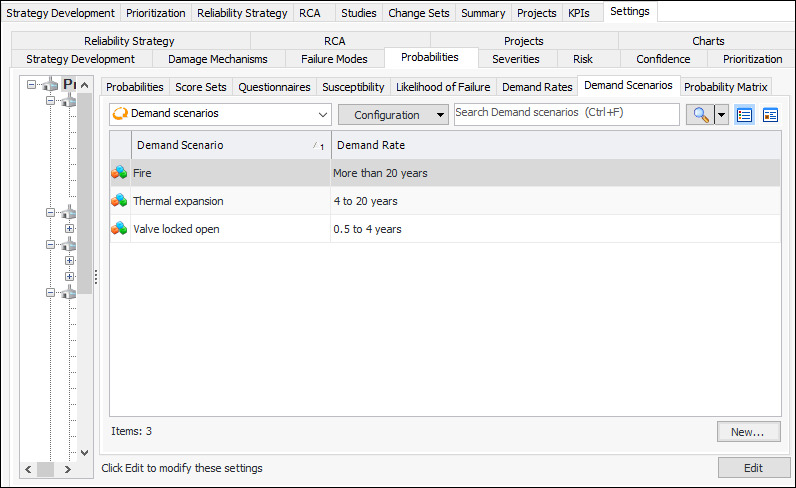
From the Site window, select the Strategy Development view, Settings tab and then the Probabilities tab. Select the Probability of Failure Settings node in the tree.
Tip: You can also select the Administration menu, Strategy Development Settings, Risk Analysis, and then Probabilities. The Strategy Development - Probability of Failure Settings dialog appears.
2.
Select the Demand Scenarios tab.
3.
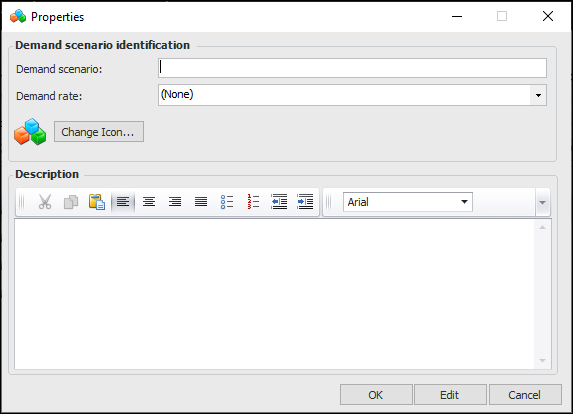
Click New. The Properties dialog appears.
4.
5.
From the Frequency list, select a value that corresponds to the demand rate.
6.
To change the image that identifies the demand scenario, click Change Icon, select a different graphic, and click OK.
7.
8.
Click OK to save the value and close the dialog. The demand scenario is added to the tab.