Setting up Failure Probabilities

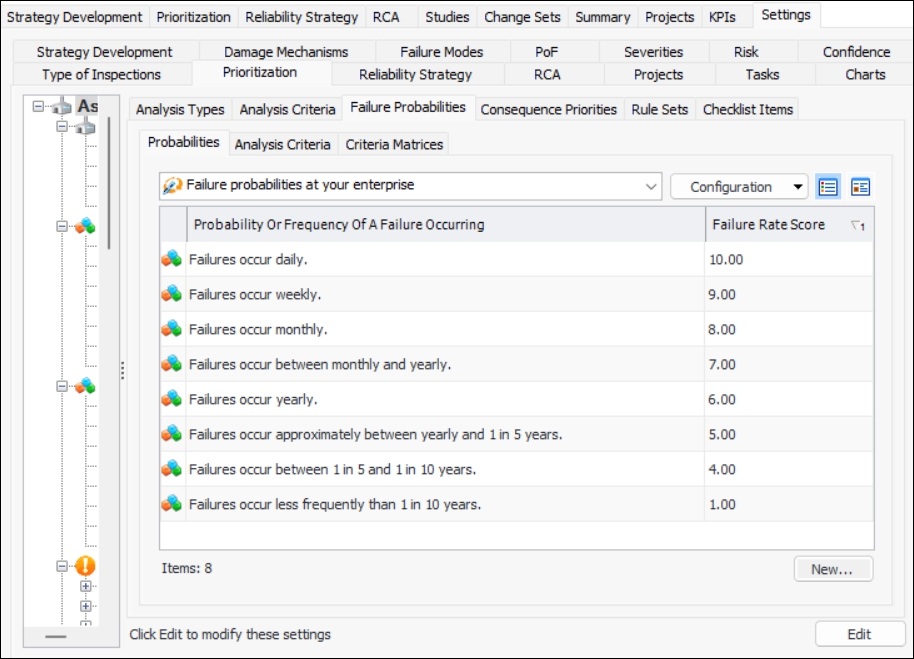
Failure probabilities (or failure rates) must also be defined and assigned scores so that analyses can arrive at the asset’s relative risk. For example, an asset that fails daily might be given a score of 10. An asset that fails less than once in 10 years might be given a score of 1. The table below outlines the suggested scores and frequencies.
APM comes with these eight failure probabilities already defined. You can edit the existing probabilities or add new ones for your organization.

To Add a Failure Probability

1.
From the Site window, select the Strategy Development view, Settings tab. Select the Prioritization tab and the Asset prioritization settings node in the tree.
Tip: You can also select the Administration menu, Strategy Development Settings, and then Asset Prioritization. The Asset Prioritization Settings dialog appears.
2.
Select the Failure Probabilities tab and the Probabilities tab.
3.
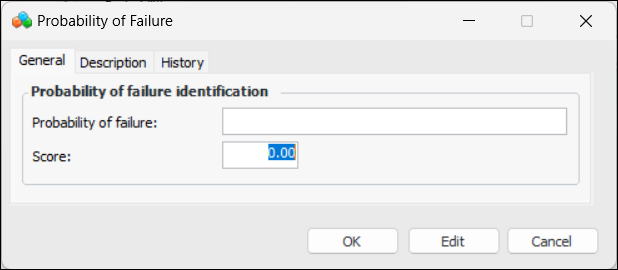
Click New. The Probability of Failure dialog appears.
4.
5.
Click OK to close the Probability of Failure dialog.