Defining Statuses for Failure Follow-up Actions

Define failure action statuses for your organization to keep track of follow-up actions for failure and anomaly records. Failure follow-up actions can include mitigation actions, requests for corrective work, and inspection tasks. This topic explains how to add action statuses.

To Define Action Statuses

1.
From the Site window, select the Performance Management view, Settings tab. Select the Failures Events tab and the Failure event management settings node in the tree.
Tip: You can also click the Administration menu, Performance Management Settings, and then Failure Event Management. The Failure Event Management Settings dialog appears.
2.
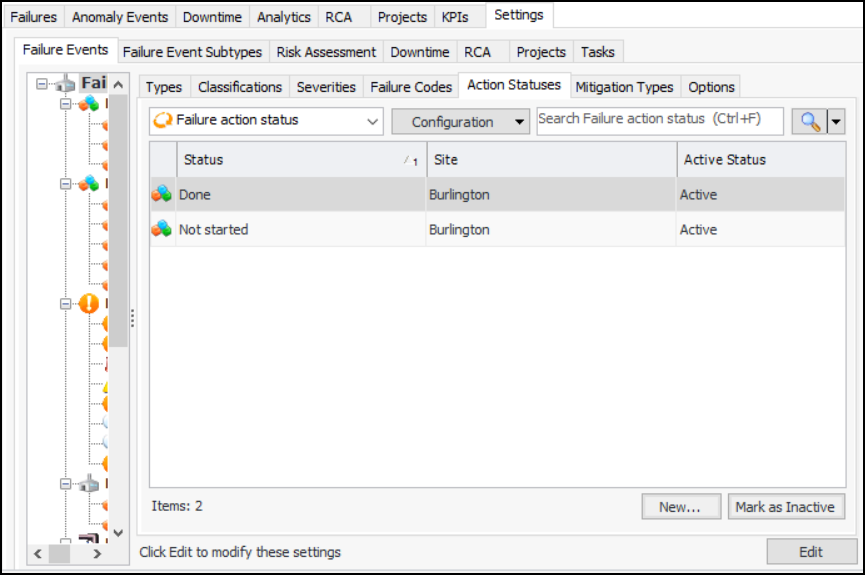
Select the Action Statuses tab:
Tip: You can select an action status and click Mark as Inactive to remove it from circulation. Provide a reason and click OK. Click Mark as Active to make it available again.
3.
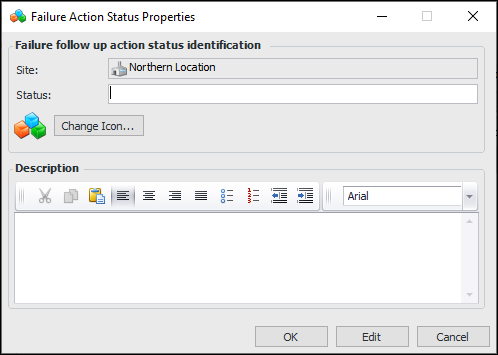
Click New. The Failure Action Status Properties dialog appears:
4.
In the Status box, enter a descriptive name for the status.
5.
To change the graphic that represents the status, click Change Icon, select a graphic, and click OK.
6.
7.
Click OK. The action status is added to the tab. By default, it is active and available for use.