|
Setting up Usage Groups
• Adding Failure Modes to the RBI Damage Mechanisms Library – explains how to assign evaluation groups to failure modes for each kind of evaluation
• Setting Failure Mode Options for Analysis Types – explains how to assign usage groups to analysis types that apply to RBI analyses.
• Setting Failure Mode Options for an RBI Analysis – explains how to assign usage groups in an RBI analysis’s Failure Mode settings.To Create a Usage Group
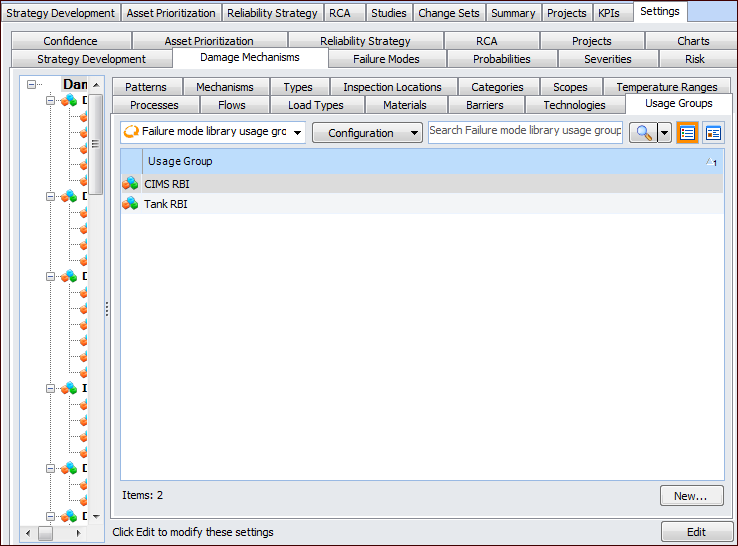
1. On the site’s Strategy Development view, select the Settings tab. Select the Damage Mechanisms tab and the Damage mechanisms settings node in the tree.Tip: You can also select the site’s Administration menu, Strategy Development Settings, and then Damage Mechanism Library. The Damage Mechanisms Management Settings dialog appears.
2. Select the Usage Groups tab.
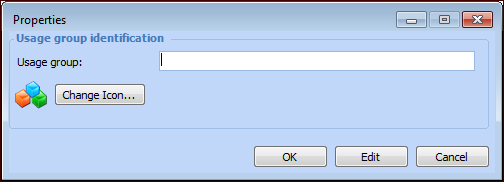
3. Click New. The Properties dialog appears.
5. To change the icon that appears for this usage group, click Change Icon, select a graphic, and click OK.
6. Click OK to close the dialog. The usage group appears in the tab.