Setting up Evaluation Groups

An evaluation group is an identifier that restricts consequence evaluation categories to specific asset types or damage mechanisms library entries. For example, a pop-up questionnaire that analysts use to evaluate the Health and Safety effects of a failure mode in an RBI analysis can display one set of questions for a Tank Roof asset and another set for a Tank Floor asset, depending on the evaluation groups assigned to the asset types and evaluation categories.
This topic explains how to create evaluation groups. For information about assigning evaluation groups see:
Consequence Severity Settings – the topics under this heading explain how to add evaluation groups to categories for probability, health and safety, environmental, and reputation questionnaires
**Setting up Asset Types – explains how to assign evaluation groups to asset types for each kind of evaluation
Adding Failure Modes to the RBI Damage Mechanisms Library – explains how to assign evaluation groups to failure modes for each kind of evaluation

To Create an Evaluation Group

1.
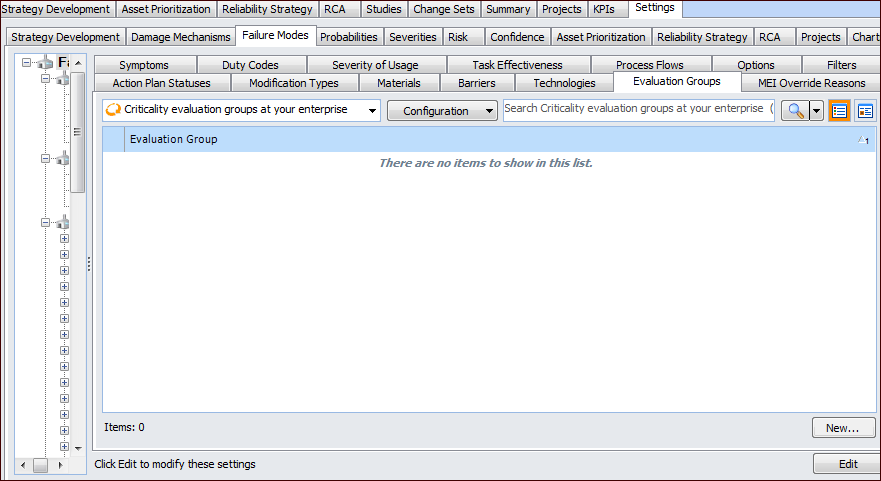
On the site’s Strategy Development view, select the Settings tab. Select the Failure Modes tab and the Failure mode settings node in the tree.
Tip: You can also select the site’s Administration menu, Strategy Development Settings, and then Failure Modes. The Failure Mode Management Settings dialog appears.
2.
Select the Evaluation Groups tab.
3.
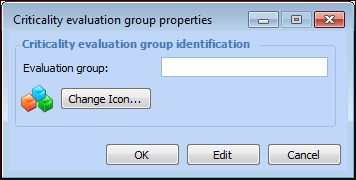
Click New. The Criticality Evaluation Group Properties dialog appears.
4.
5.
To change the icon that appears for this evaluation group, click Change Icon, select a graphic, and click OK.
6.
Click OK to close the dialog. The evaluation group appears in the tab.