|
Setting up Lining Conditions
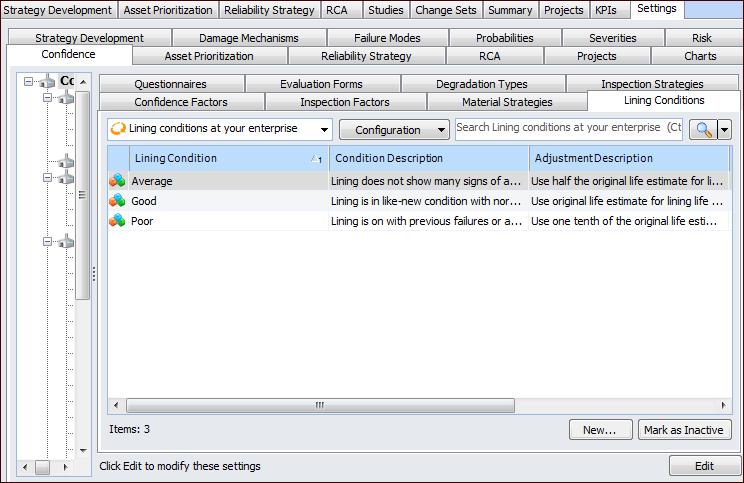
1. On the site’s Strategy Development view, select the Settings tab. Select the Confidence tab and the Confidence Analysis Settings node in the tree.Tip: You can also select the site’s Administration menu, Strategy Development Settings, Risk Analysis, and then Confidence. The Strategy Development – Confidence Analysis Settings dialog appears.
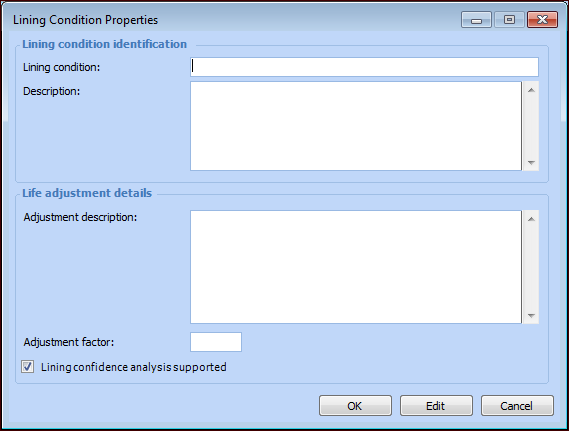
2. Click New. The Lining Condition Properties dialog appears.
4. Click OK. The dialog closes and the condition is added to the tab.Tip: You can mark a condition as inactive until it is ready to be used. On the Lining Conditions tab, select the condition in the table and click Mark as Inactive. The Mark as Inactive window appears, where you can enter a comment. When you click OK, a confirmation message appears. Click OK. The condition’s Active Status in the table is shown as “Inactive”. When you are ready, click Mark as Active to make the condition available.