Setting up Confidence Factors

The confidence factor represents the analysis team’s faith in current maintenance or inspection practices to contain the failure mode’s risk. The higher the value, the greater the confidence. The confidence factor can adjust the inspection factor or likelihood of failure up or down.
Confidence factors can be used in:
When creating degradation types to determine inspection strategies, you can select a default confidence factor for degradation types that do not require confidence evaluations. The confidence factor is then selected by default when the degradation type is chosen in a failure mode risk analysis. A default confidence factor is only available when the degradation type does not support confidence questions.
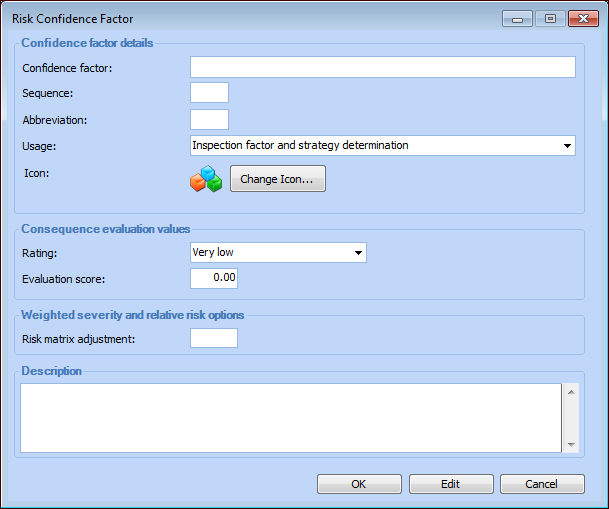
When setting up confidence factors, assign each one a descriptive consequence rating (for example “High”) and an evaluation score (for example, “2”) that represent its importance relative to other confidence factors. When you set up an inspection factor, you can select the confidence factors that applies to it.
The confidence factor is also used when failure mode risk analysis is based on weighted severity and relative risk. The risk matrix adjustment value assigned to the confidence factor can adjust the risk matrix entry up or down.

To Create a Confidence Factor

1.
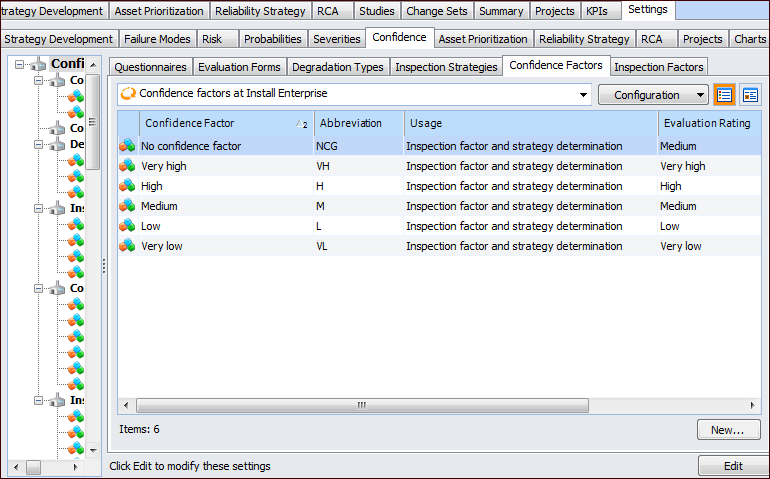
On the site’s Strategy Development view, select the Settings tab. Select the Confidence tab and the Confidence Analysis Settings node in the tree.
Tip: You can also select the site’s Administration menu, Strategy Development Settings, Risk Analysis, and then Confidence. The Strategy Development – Confidence Analysis Settings dialog appears.
2.
On the Confidence tab, select the Confidence Factors tab.
3.
Click New. The Risk Confidence Factor dialog appears, for example:
4.
5.
To change the image that identifies this factor, click Change Icon, select a different graphic, and click OK.
6.
7.
8.
9.
Click OK. The dialog closes and the factor is added to the table.