Evaluating Susceptibility to Failure for MTA2 Failure Modes

Susceptibility to failure evaluation examines the asset’s non-age related degradation patterns. It can provide an alternative to probability of failure analysis for these failure modes. For example, susceptibility evaluation can be used to determine the vulnerability of atmospheric storage tanks to corrosion under insulation or stress cracking. The evaluation can result in recommended actions, susceptibility ratings, or both.
A susceptibility to failure questionnaire presents you with a series of questions. Like a decision diagram, the response to one question determines the next question, and so on, until a conclusion is reached. Along the way, instructions can be displayed to respond to individual answers.
Note: Before you can perform susceptibility evaluation, the questionnaire must be created and then selected in the analysis’ risk options. APM users with the Administrator privilege can create questionnaires in the site’s strategy development settings. For more information, see Setting up Susceptibility to Failure Questionnaires.
This topic explains how to use a susceptibility to failure questionnaire to evaluate a failure mode’s asset.

To Evaluate Susceptibility to Failure

1.
2.
3.
Select the Susceptibility view.
4.
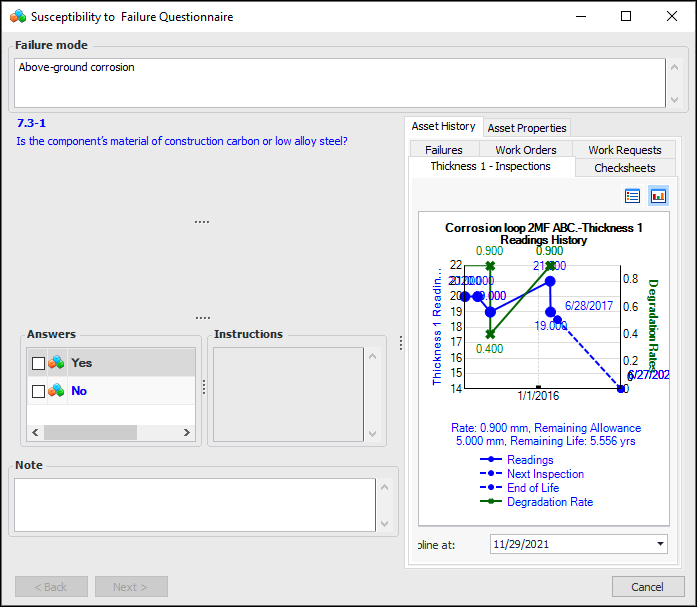
Click Analyze. The Susceptibility to Failure Questionnaire appears. For example:
The Asset History and Asset Properties tabs display information about the analysis asset to aid in the evaluation.
5.
Complete the evaluation, selecting an answer for each question, entering notes, and using the Next and Back buttons to move between questions. As you move through the analysis, secondary questions, examples, and instructions might be displayed. When you have completed the questionnaire, the Finish button is displayed.
6.
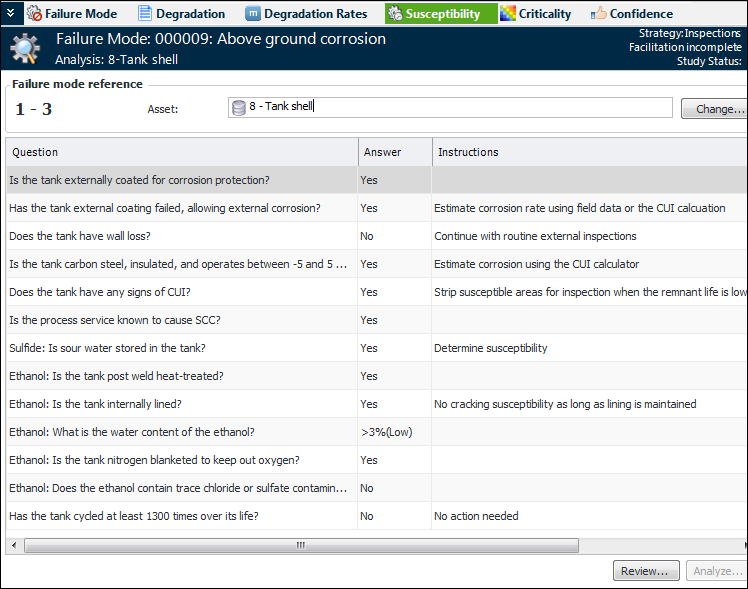
Click Finish to close the dialog. The questions, instructions, and your answers and notes are shown in the Susceptibility tab. For example:
7.
Click Review when you wish to revisit the analysis, change your answers, or add notes.