Creating Secondary MTA2 Action Plans

Sometimes one action is not enough to deal with a failure mode in a strategy development analysis. For example, an asset’s failure mode might require a condition-based maintenance task to check for signs of wear, a physical modification to the asset, and a modification to procedures (for example, training for maintenance personnel). In cases like this, you can add secondary action plans to the failure mode, and you can have more than one task with the same action type. For example, you might need two modification/redesign tasks.
An additional task type is available for secondary action plans: “Review existing maintenance”. This action plan alerts the analysis team to review an asset’s existing maintenance program to identify items that are no longer required or require modification.
This section explains how to add secondary action plans to existing failure modes.
Tip: The Action Plans view in the analysis window lists the action plans for each failure mode. The Action Plan Type column indicates whether the action plan is primary or secondary.

To Create a Secondary Action Plan

1.
From the site’s Strategy Development view and tab, select the MTA2 tab.
Tip: You can also open a failure mode by opening an asset and selecting the Strategy Development view, Strategy Development tab, and Failure Modes tab.
2.
3.
4.
Select the Facilitation view, Info Worksheet tab. Double-click the failure mode to open the Maintenance Action Plan window.
5.
Select the Implementation view and the Secondary Action Plans tab.
6.
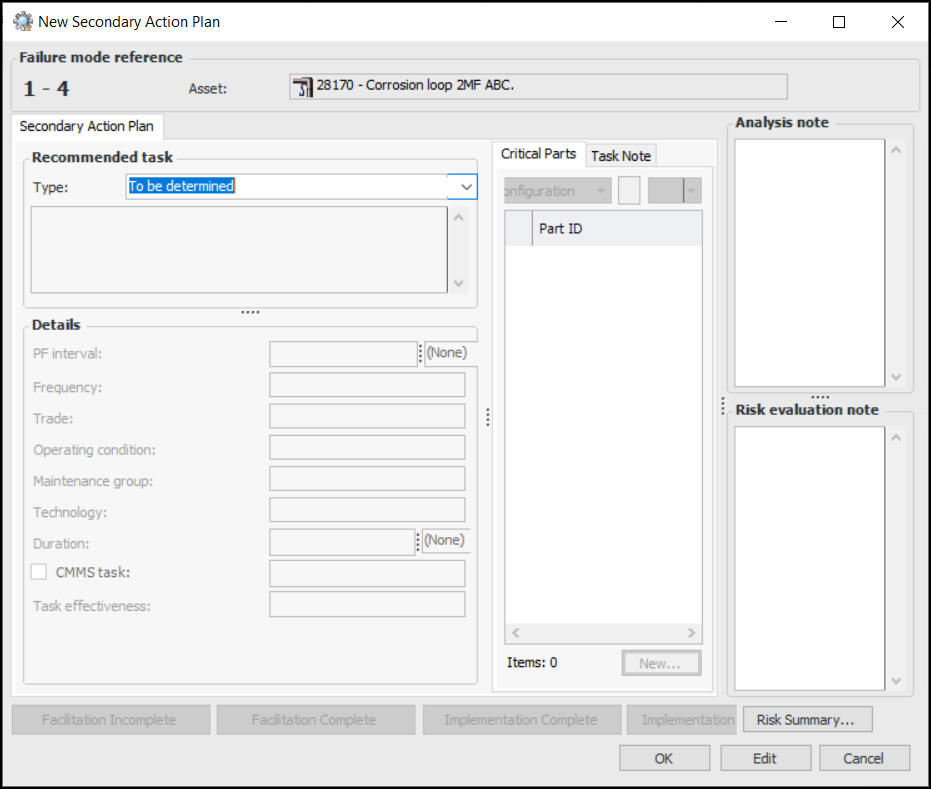
Click New. The New Secondary Action Plan window appears.
Tip: If an inspection strategy has been assigned to the failure mode, the strategy and its description are displayed on the Inspections tab.
Tip: Click Risk Summary below the Risk evaluation note box to view the primary action plan’s risk summary and confidence evaluation.
7.
Note: If APM is configured to interact with a SAP Plant Maintenance system, System condition and Work center are available in the Details area.
8.
9.
For more information, see:
10.
11.