Locking Supplier Resource Rankings on an RFQ

Once you are happy with the supplier bid rankings for a resource, you can lock the ranking so that it cannot be changed by further analyses. If you later want to change a locked ranking, you can unlock it.

To Lock Supplier Resource Rankings

1.
2.
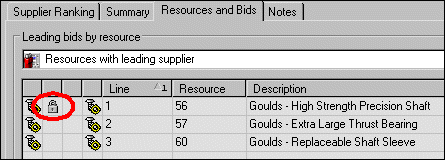
Select the Analysis view and then the Resources and Bids tab. This tab displays a list of the resources on the RFQ and the leading supplier for that resource.
3.
To lock the rankings for a resource, right-click the resource and select Lock Ranking. A lock icon appears beside the resource in the table.
4.
To unlock a resource, right-click the resource and select Unlock Ranking. The lock icon is removed from the table.