|
Linking a Standard Task to an SAP Maintenance Item or Task List
Tip: In the Standard Task window, select the SAP Properties view to see detailed information about the linked maintenance item or task list.To Link a Standard Task to an SAP Maintenance Item
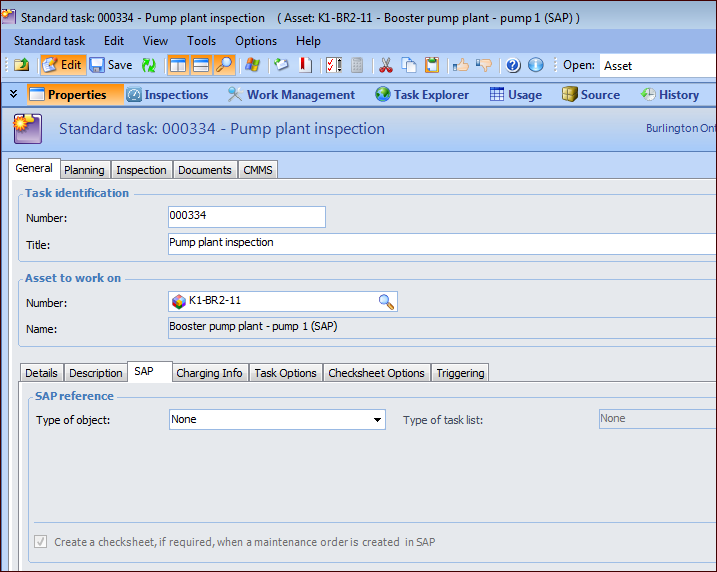
1. Open the Standard Task window. For example, select the Reliability Program view, Tasks tab in the Site or Asset window. Locate the standard task in the list and double-click it.
3.
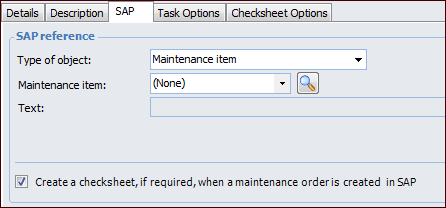
4. In the Type of object list, select “Maintenance item”. The tab changes as follows:
5. Click the Maintenance item list to select from the items for the functional location or equipment linked to the standard task’s asset. To select from a larger list, use the browse icon:
•
6. The option Create a checksheet, if required, when a maintenance order is created in SAP is selected by default. A checksheet is generated from the standard task when a maintenance order is created in SAP that is based on the linked maintenance item. You can clear this option to disable the functionality for the standard task.To Link a Standard Task to an SAP Task List
1. Open the Standard Task window. For example, select the Reliability Program view, Tasks tab in the Site or Asset window. Locate the standard task in the list and double-click it.
3.
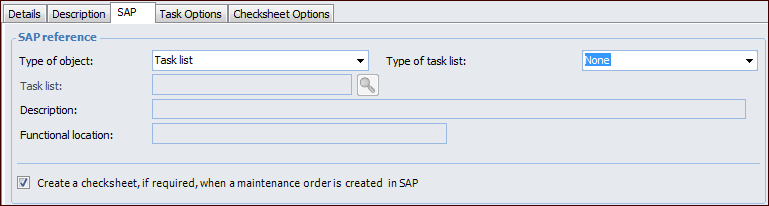
4. In the Type of object list, select “Task list”. The tab changes as follows:
6. Click the Task list list to select from the task lists for the functional location or equipment linked to the standard task’s asset. To select from a larger list, use the browse icon:
• Select the task list and click OK. The task list’s information is displayed in the SAP tab, including its functional location or equipment.
7. The option Create a checksheet, if required, when a maintenance order is created in SAP is selected by default. A checksheet is generated from the standard task when a maintenance order is created in SAP that is based on the linked task list. You can clear this option to disable the functionality for the standard task.