Setting Defaults for Characteristic Mapping

The characteristics functionality makes it possible to import object attributes from an external system (CMMS) and to map the characteristic values to the properties of APM objects. AWEIS can create characteristics as needed when adding assets, work requests, work orders, and solution packages to APM. APM uses characteristic map sets to update the corresponding properties of interop assets and work documents.
Outgoing asset change requests and requests for work can include characteristic values that are sent to the CMMS. For example, when APM creates a request for work, it refers to the appropiate characteristic map set to export information from the request that can then update characteristics in the corresponding object in the CMMS.
Setting up characteristics involves:
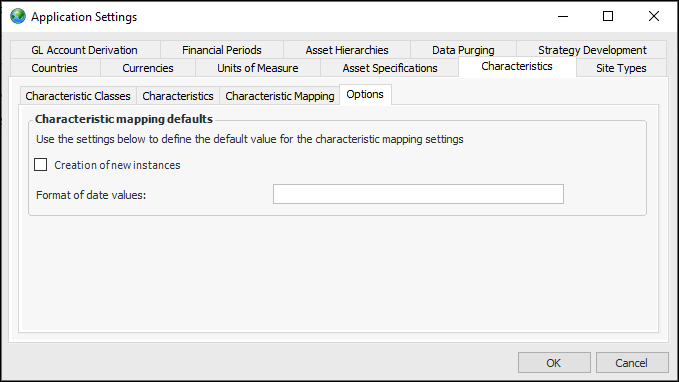
This topic explains how to set default options at the enterprise level: creation of instances and format for date values.
When automatic creation of characteristic instances is enabled, AWEIS creates the instance when it cannot find a matching one. On SQL Server, the search for a match does not consider case. For example, “Material” matches “material”, so another characteristic is not created. On Oracle, the search is case-sensitive.
When a date format is not selected as a default, dates are accepted in several formats, although the accuracy of .NET parsing is not guaranteed. When specifying the date format, use .NET standard or custom date formats. For example:
For more information, see the Microsoft articles:

To Set Default Options for Characteristic Mapping

1.
2.
Click the Administration menu and then Application Settings. The Application Settings dialog appears.
3.
Select the Characteristics tab and then the Options tab:
4.
When this option is selected for the application, the Create new instances as required option is selected by default in the Characteristic Mapping dialog when the type of target property is Relationship and the relationship is to a class owned or scoped by Enterprise or Site.
When a format is specified for the application, it appears as the default in the Date format option of the Characteristic Mapping dialog when the target attribute uses a date/time operator.