Indicator Readings

To record the value or state of an indicator at a specific moment in time, an indicator reading is entered in APM. Groups of indicator readings are entered on checksheets. You can also enter single “ad hoc” indicator readings.
If you need to collect many indicator readings, you can create a work order task to enter the readings. When you are ready to enter the readings, you can enter them on a checksheet created from the task.
If you collect the same sets of indicator readings on a regular basis, you can set up standard tasks and standard jobs to do this. You can then create work orders from the standard tasks and jobs to collect and record the readings. Once you have collected the readings, you can enter and process them from the work order checksheet. You can also create ad hoc checksheets from the site or asset and then add the indicators to read.
You can also create checksheets directly from a standard task, without the need for a work order. You can create checksheets from a standard job as long as the job does not contain a task template.
Whenever you save an ad hoc reading or process a checksheet, APM records the date and time of the readings and evaluates any triggering rules or calculations based on the indicator. APM can use the readings you collect to trigger standard jobs or PM routes.
Note: If you enter a reading for an indicator that predates the indicator’s most recent reading, the reading does not trigger any alarms, standard jobs, or calculated indicators.
For information about indicator collection windows, see Indicator Collection Dates: Calculations, Windows, and Compliance Tracking.

Methods of Collecting Indicator Readings

When you create an indicator, you can select how the readings are collected. The collection methods that are available depend on the value category of the indicator.
The collection methods that apply to each value category are shown here:
 
If you enter the reading directly into APM or use a mobile device to collect and enter readings, select Manually entered. Select Collected from an on-line source only if your equipment includes devices that automatically collect and enter data directly into APM.

Incorrect Readings

Occasionally, incorrect readings for indicators are entered by mistake and processed. When these raise alarms, they are usually caught and identified as incorrect as part of the acknowledgment process. However, many incorrect readings are entered that do not raise alarms. Although incorrect, they are still within the normal range and thus go undetected. Typically, they are found later when analyzing the history of readings for an indicator. For example, when looking at a line plot of readings for an indicator, a particular reading stands out because it is significantly lower or higher than the trend.
Because these readings can skew results if they are used in calculations, you can mark such readings as incorrect. Readings that are flagged as incorrect are omitted from charts and are not included in the values of aggregate calculation inputs. However, any calculations that have already occurred are not corrected. Similarly, PM jobs that might have been triggered by the incorrect reading are unaffected.
If a failure record was created when the alarm was acknowledged, the failure is deleted.
A reading can be marked as incorrect at any time after it has been processed. Only numeric, calculated, cumulative, descriptive, and performance indicators can have readings marked as incorrect. Readings for rule-based indicators cannot be marked as incorrect.
For more information, see Marking an Indicator Reading as Incorrect.

Cascading Cumulative Indicator Readings

Sometimes you might want to collect an indicator reading and apply it to more than one asset. For example, you might want to track the mileage on a truck but also record the same mileage on the truck’s child assets, such as the transmission and engine.
In APM, you can do this using cascaded indicators. With cascaded indicators, you can enter odometer readings once for the truck and this information is tracked on whatever other assets you assign to the cascade. A cascaded indicator gets its readings from another asset indicator.
Note: Only cumulative indicators, such as indicators that track mileage, operating hours, production, and so on, can be cascaded. Numeric, descriptive, and rule-based indicators cannot be cascaded.
The indicator that collects the readings and pushes them out to other indicators is called the “source” indicator. The indicator that receives its readings from a source indicator is called the “cascaded” indicator.
Normally, cascaded indicators use the same unit of measure as the source indicator. However, you can change the unit of measure to another one within the same category. When the readings are cascaded, they are translated into the correct unit of measure.
Each time a new reading is recorded for a source indicator and the reading is processed, APM updates the cascaded indicator. The cascaded indicator readings are processed the same way as for a normal indicator reading. This includes:
For more information, see Cascading Indicator Readings to Other Assets.

Swappable Components

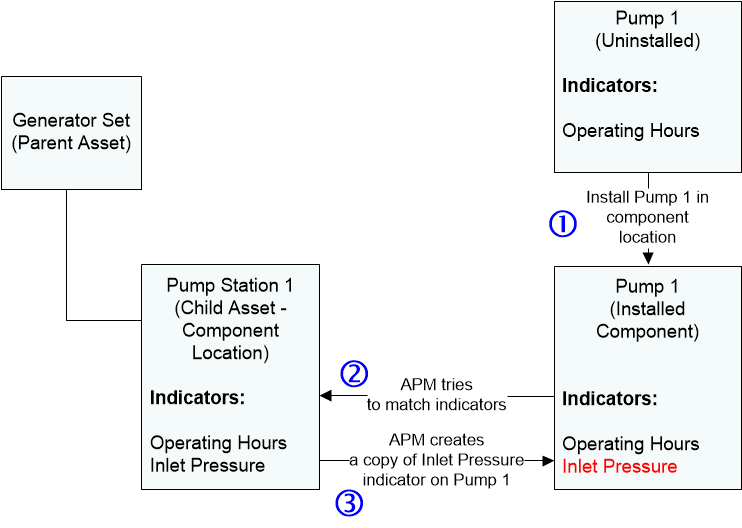
If your asset hierarchy includes components installed in component locations, you should try to define the indicators on both the component location and the component. When you install a component in a location, APM tries to match the indicators on the two assets using their names and value categories. If the location has an indicator that the component does not have, APM creates a copy of the indicator on the component, as shown below.
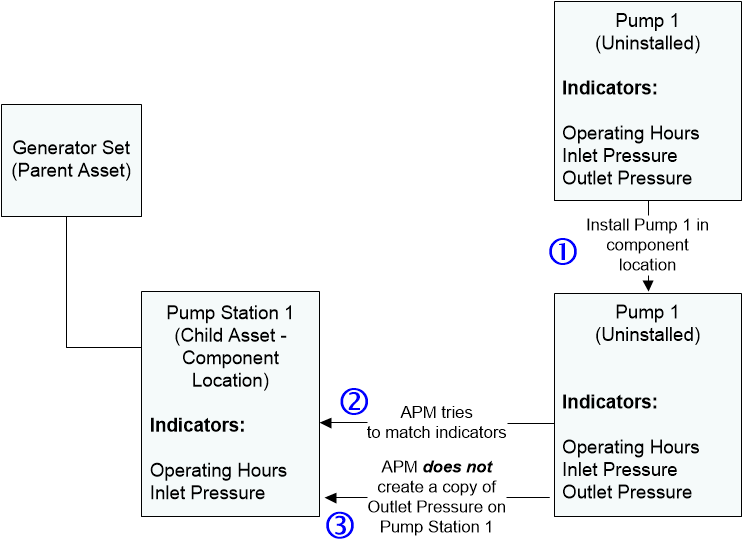
However, the inverse is not true. APM does not create an indicator for a component location if it finds an indicator that exists only on the component. In this case, usually either the indicator is measuring something specific to the component or the indicator got “picked up” when it was installed in a previous location.

Behavior of Indicators on Installed Components

Once the indicators are matched, a reading entered on one indicator also applies to the other. For example, if you enter a pressure reading from the location, it is also entered on the component’s matched indicator. If there are indicators on either the component or location that do not match, indicator readings are not copied to the other asset.
When a component is installed into a component location with a rule-based indicator, APM tries to match the rule-based indicator on the location to an indicator on the component. If a match is made, APM sets the triggering rule on the component’s indicator to be the same as the triggering rule for the location’s indicator. This ensures that APM is evaluating the component indicator’s triggering rule using indicators that are relevant to where the component is installed.

Installing or Removing Components with Indicators

When you install a component in a location, APM applies the reliability program defined on the location to the component. When you swap components, you can reset the cumulative indicators on both the component and the location. The current value of the indicators change so that values on the installed component and the location match, but the life-to-date values of each indicator does not change. The life-to-date meter always stores the correct value for the specific asset on which it is defined.
When you swap components, the reliability program of the component location is restarted for the new component. All time-based triggers start tracking time from the date that the swap occurred, and the indicators on the location are reset. For example, if you swapped a motor that needs a vibration analysis every three months or 400 operating hours, the triggering rule starts counting to three months from the date that the swap occurred and the indicator that tracks operating hours is reset to zero hours.
If you remove a component from a location and change its asset status to a non-operational status (such as “spare”), this affects any calculated or cascaded indicators on the component. If a component has a non-operational status, APM does not create new readings for the calculated indicators and does not update cascaded indicators on the component with new readings from the source indicator.