Overview of the Mass Indicator Update Wizard

You can copy properties from one indicator to a group of other indicators using the Indicator Mass Update wizard. For example, you could modify indicator states on an indicator template and then copy the states to all of the indicators that are based on that template. Or you could copy search values, such as trade, maintenance group, or PdM technology from one indicator to several other indicators.
You can copy properties from any variety of indicator, including indicator templates and key performance indicators (KPIs). Once you select the source indicator and the properties to copy, the wizard automatically presents you with the appropriate target indicators. The target indicators must be the same type as the source indicator and on the same or a lower site in the hierarchy. You cannot copy properties between asset indicators and KPIs.
This topic explains:

Indicator Properties that are Eligible for Mass Update

You can copy the values of several data members that belong directly to the Indicator class. These types of data member support mass update:
You can also use the wizard to copy values from classes that are related to the Indicator class through a contains-one relationship. For example, Recurrence pattern is a contained class that is used to define the calculation frequency of a calculated indicator.

Components and Component Locations

If you update an indicator on a component or component location, the indicators on the matching component or location are also updated. For example, if you update an indicator on a component installed into a parallel hierarchy, these indicators are updated:

Updating Indicators on Another Site

You can update indicators on a different site, however, standard tasks, standard jobs, and maintenance groups referenced by the indicator are not copied to the target indicators. Assets and trades from a parent site can be copied.
TOP

Dependencies Between Properties

Dependencies sometimes exist between properties. One property might have to be set a certain way before another property is editable. For example, for a numeric indicator to be updated with Indicator states, its “Indicator states exist” attribute must be set to “Yes”.
Whether or not you need to copy the controlling attribute can depend on the target indicators’ settings. For example, if you are updating states that already exist on numeric indicators, it is not necessary to copy the “Indicator states exist” attribute. However, if some of the target indicators do not already have states, you will need to copy the value of “Indicator states exist” as well.

How Collections are Updated

When a collection, such as Indicator States, is selected to be copied in the wizard, APM compares the items in the collection of the source indicator to those of each target indicator and does the following:

How Calculation Inputs are Updated

When you copy calculation inputs, any references to other assets or indicators are handled differently depending on where the input indicators are located, that is, whether they are on the same asset as the calculated indicator or on a different asset.
If the calculation input on the source indicator points to an indicator template, the copy logic looks for an existing indicator on the target asset that is based on the same template. If one is found, the new calculation input on the target indicator points to the existing indicator. If no match is found, a new indicator is created from the template on the same asset as the target indicator and the new input is made to point to it.
If the calculation input on the source indicator points to an indicator on the same asset as the source indicator, the copy logic looks for an existing indicator on the target asset that has the same name. If one is found, the new calculation input on the target indicator points to the existing indicator. If no match is found, a new indicator is created on the same asset by copying the indicator on the source calculation input and the new input is made to point to it.
If the calculation input on the source indicator points to an indicator on a different asset from the source indicator, the copy logic simply creates the new calculation input on the source indicator and makes it point to the same indicator as the source calculation input.
TOP

Using Mass Update to Remove Properties from Indicators

You can use the Indicator Mass Update wizard to remove properties from target indicators. Copying a data member with a blank value removes the corresponding value on the target indicator.
As an example, you can remove states on numeric indicators by copying a source indicator’s “Indicator states exist” attribute with the value “No”. When the target indicators are updated, not only are their “Indicator states exist” attributes changed, but any states defined on them are removed. Similarly, you can delete a state on a numeric or descriptive indicator and then copy “Indicator states” to target indicators of the same type. The state is removed from the target indicators.
If a target indicator has readings that use the disabled or removed state, the state is flagged as “Obsolete” on those readings. For example:
If an alarm has been activated by a reading that cites a state that has since been deleted, the alarm remains active until acknowledged. The only change in the reading is that the state is shown as “Obsolete”.
If you attempt to delete a state from a target indicator when a triggering rule that refers to the indicator uses the state, the state is marked “Obsolete”.

Indicator Properties that Cannot be Updated

Generally, you cannot copy data members that are read-only or disabled in the source’s Indicator window. This includes data members that are permanently read-only, those that are temporarily read-only or disabled because of the indicator’s state, or those that you are not authorized to update because of your security profile. For example, you cannot use the wizard to change the unit of measure on the target indicators if readings have been entered on the source or target indicators because the UoM field then becomes read-only. These rules also apply to attributes or relationships that you added as customizations.
The Indicator Mass Update wizard respects your security settings. That means that you cannot select a data member to copy if your security profile does not allow you to edit the attribute or relationship in the indicator window. The Indicator Mass Update wizard uses the security profile defined for the site that owns the source indicator when determining if you have update access for each data member.
Note that if you try to copy a data member to an indicator at a different site and you do not have authorization to update that data member in the other site, the update will fail for that indicator.

When Update Requests Fail

When the update request is processed, the same business and validation rules apply as when you edit an indicator manually. As a result, attribute states, validation rules, and security settings are also respected. In other words, the mass update feature does not allow you to set data that you would otherwise be prevented from updating directly in the user interface.
Some changes might fail to be applied to the target indicators, for example, if the copied values cause an error, the attribute is read-only, and so on. When this happens, you are informed at the end of the process that certain changes could not be made. The wizard records a list of the indicators that were updated successfully and a list of those that could not be updated, along with the reasons for the failures.
For more information, see Troubleshooting Indicator Mass Update Requests.
TOP

Indicator Value Types and Their Dependencies

The following sections list common data members that are eligible for mass updates (for example, “Searching” properties). Then data members specific to each of the basic types of indicator values are listed: cumulative, descriptive, numeric, and rule-based. Each section explains any exceptions and dependencies that you should know about. This information applies to asset indicators, indicator templates, and performance indicators (KPIs), with exceptions noted.

KPIs

The following sections apply to KPIs, unless otherwise noted. In addition, you can copy the “Asset Reliability Process elements measured by this KPI” reference between KPIs. For numeric and cumulative KPIs that use a formula to calculate values, you can also copy “Starting value” and “Target” attributes.

Common Data Members

The following simple references can be copied from indicators with any type of value. They can be copied from templates and from KPIs.
The following attributes are also available for all indicator types, and they do not have dependencies:

Cumulative Indicators

A cumulative indicator is an indicator that tracks a value that increases over time. For example, an odometer is cumulative. Today’s reading will always be higher than yesterday’s reading. A cumulative indicator can be read as either an accumulated value (the value over the lifetime of the indicator) or as a consumed value (the difference from the last reading).
Collection methods for cumulative indicators are:
Note: Initial values (current value and life-to-date value) cannot be copied from cumulative asset indicators to target indicators.
TOP
The following table lists the data members of the Indicator class that can be copied between cumulative indicators using the Indicator Mass Update wizard. It also specifies each data member’s type (attribute, collection, or simple reference). The “Notes” column lists exceptions and dependencies: properties whose values must already exist on the target indicators or be copied to them.

Dependencies

Dependencies

Dependencies

Dependencies

Dependencies

Dependencies

Dependencies

Dependencies

Dependencies

Dependencies

Dependencies

Not available to copy for templates or KPIs

Dependencies

Dependencies

Dependencies

Dependencies

Dependencies

Dependencies

Dependencies

TOP

Descriptive Indicators

A descriptive indicator is an indicator that has a distinct set of values that can be detected but not measured in numbers. For example, if you have an indicator that measures tire condition, a list of possible values for the condition of the tires would be “Good Condition,” “Slightly Worn,” or “Threadbare.”
Collection methods for descriptive indicators are:
The following table lists the data members of the Indicator class that can be copied between descriptive indicators using the Indicator Mass Update wizard. It also specifies each data member’s type (attribute, collection, or simple reference). The “Notes” column lists exceptions and dependencies: properties whose values must already exist on the target indicators or be copied to them.

Dependencies

Dependencies

Dependencies

Dependencies

Not available to copy for templates or KPIs

Dependencies

Dependencies

Dependencies

Dependencies

Dependencies

Dependencies

TOP

Numeric Indicators

A numeric indicator is an indicator that records any value within a finite or infinite interval. For example, an indicator that measures temperature or pressure is numeric. Today’s reading may be either higher or lower than yesterday’s reading. Numeric values can go up and down over time. Numeric indicators can use calculations to collect readings.
Collection methods for numeric indicators are:
The following table lists the data members of the Indicator class that can be copied between numeric indicators using the Indicator Mass Update wizard. It also specifies each data member’s type (attribute, collection, or simple reference). The “Notes” column lists exceptions and dependencies: properties whose values must already exist on the target indicators or be copied to them.

Dependencies

Dependencies

Dependencies

Dependencies

Dependencies

Dependencies

Dependencies

Dependencies

Not available to copy for templates or KPIs

Dependencies

Dependencies

Dependencies

Dependencies

Dependencies

Dependencies

Dependencies

TOP

Rule-Based Indicators

A rule-based indicator is an indicator where the current state is determined by a rule rather than by a direct reading. The rule is made up of clauses based on the current state of other indicators. The rule allows APM to warn you of the existence of a potential problem.
Note: You cannot copy the indicator’s rule clauses or expression.
The following table lists the data members of the Indicator class that can be copied between rule-based indicators using the Indicator Mass Update wizard. It also specifies each data member’s type (attribute, collection, or simple reference). The “Notes” column lists exceptions and dependencies: properties whose values must already exist on the target indicators or be copied to them.

Dependencies

Dependencies

TOP

Making Custom Properties Available for Mass Update

If you have customized the Indicator class, any attributes and relationships that you added to the class are subject to the same rules as non-customized classes. That is, users cannot select for mass updates any data members that are read-only or disabled in the source’s Indicator window.

Attributes

Customized attributes are available for mass updates as long as they do not have the following data types:

Relationships

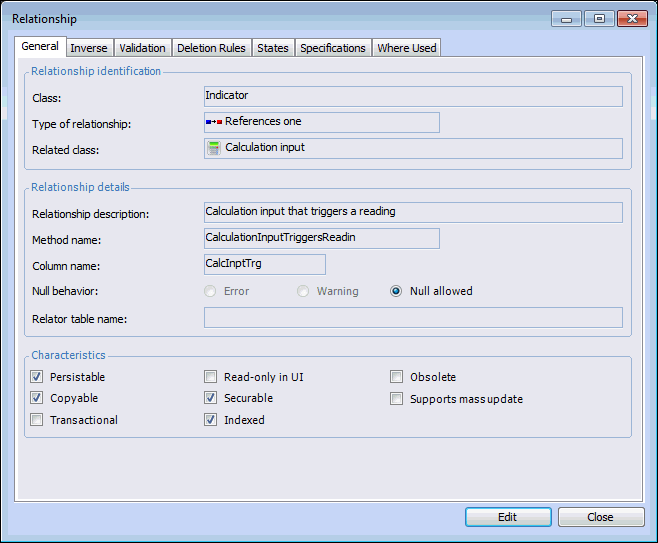
When you are adding an Owns Many, References Many, References One, or Contains One relationship to a custom Indicator class, the Supports mass update option is available. For example:
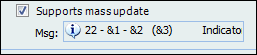
Select Supports mass update if you wish to make the relationship available for mass update requests. Unless the relationship is References One, the Msg list appears.
You must also create an informational message on the related class to specify the value to display in the Values to Copy window of the Indicator Mass Update wizard. Then select the message from the Msg list. For example:

The example above is taken from the Indicator class’ Owns Many relationship with the Calculation Input class. The informational message is on the Calculation Input class. The message arguments refer to the Input Name (&1), Input Description (&2), and Input Type (&3). In the Indicator Mass Update wizard, the value to be copied might appear as “Input1 - Last Reading of Indicator A (Based on readings)”.
For more information, see Creating Custom Messages in the Customization Guide.
TOP