Publishing Readings to an External System

APM supports publishing indicator readings to an external system. When selected readings are processed, APM generates an XML document that can then be consumed by Bentley Enterprise Connection Services, for example, and distributed to another system.
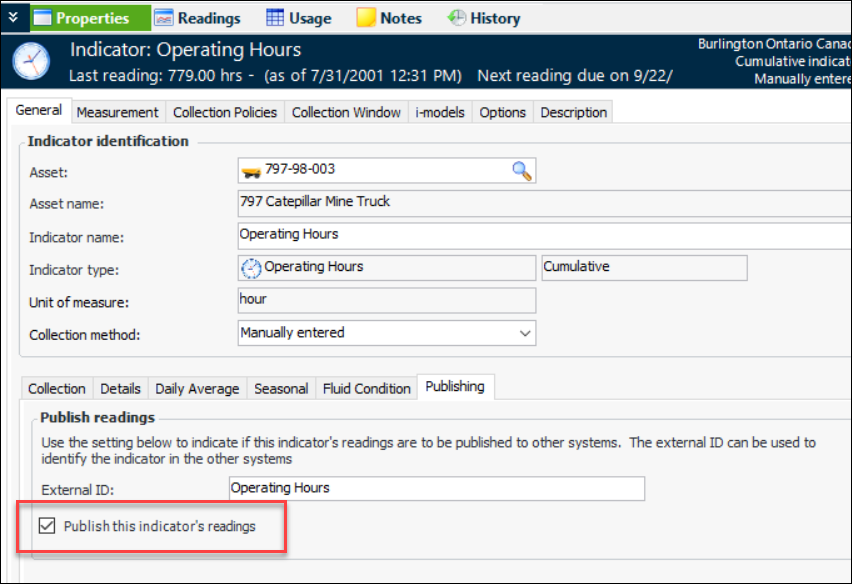
This functionality is supported for all types of indicators. The indicator and its type must have publishing enabled.
Note: The Publish Indicator Readings functionality is generally available. You must first enable feature 92 to use the functionality in APM. In the Enterprise window, select the Features view and the Enabled Features tab. Click Browse, select “Publish indicator readings to an external system” and click OK. If APM is running as a smart client, click Refresh Enabled Features on the server. Then restart the client to use the functionality.
The Publish Indicator Readings interface package includes the following indicator reading properties:

To Set up APM to Publish Indicator Readings
1.
2.
For more information, see Setting up Site Interoperability Profiles for AWEIS.
3.
For more information, see Setting up APM Outbound Events.
4.
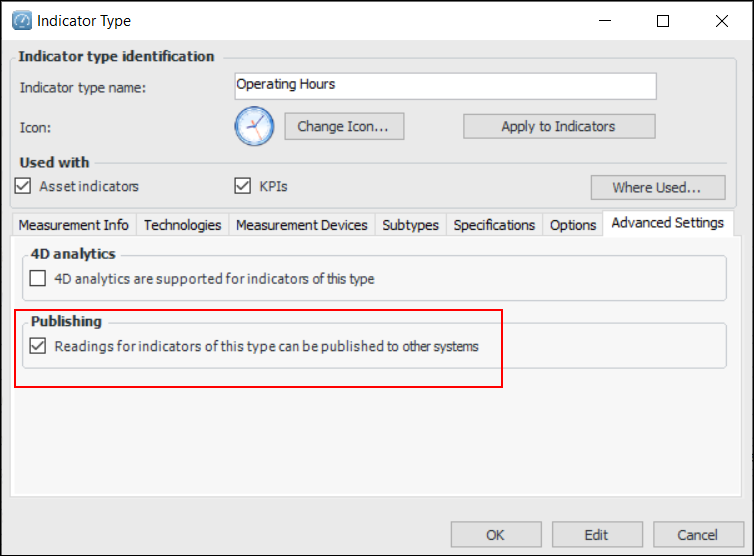
Create or update indicator types. In the Indicator Type window, select the Advanced Settings tab and click Readings for indicators of this type can be published to other systems.
5.
Create or update indicators or indicator templates to allow readings to be published. In the Indicator window, select the Properties view and General tab. The Publishing tab is available if the indicator type supports publishing. Click Publish this indicator’s readings.
When indicator readings are processed for this indicator, an XML document is produced and distributed to the external system that Bentley has integrated for your organization.