Undoing Alarm Acknowledgments

If necessary, you can undo the acknowledgment of an indicator warning or alarm. This action is only possible if the following statements are true:
If a failure record was created when the alarm was acknowledged, the failure is deleted when the acknowledgment is reversed. You can also cancel a request for a follow-up reading.
When an acknowledgment is reversed, APM does the following:
Note: If you flag an acknowledged alarm reading as incorrect and then wish to re-acknowledge the alarm, remove the incorrect reading flag. This returns the indicator to an alarm state. The same procedure is required for alarms that were acknowledged with other methods and then marked as incorrect readings. For more information, see Undoing an Incorrect Reading Flag.
This topic explains how:

To Undo an Acknowledgment with an APM Work Document

1.
2.
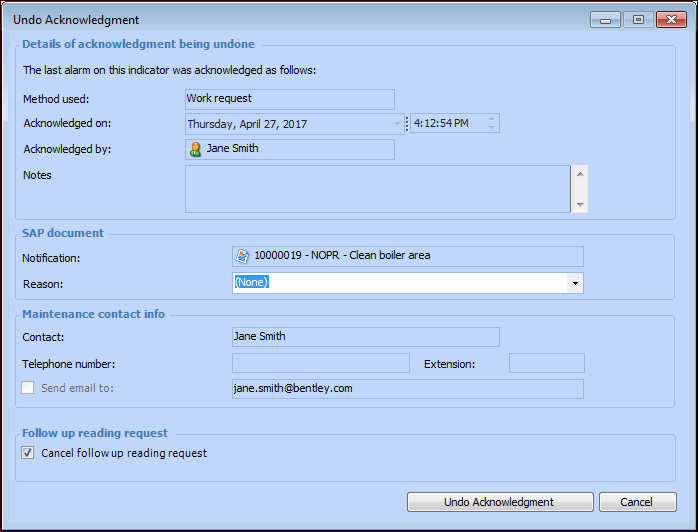
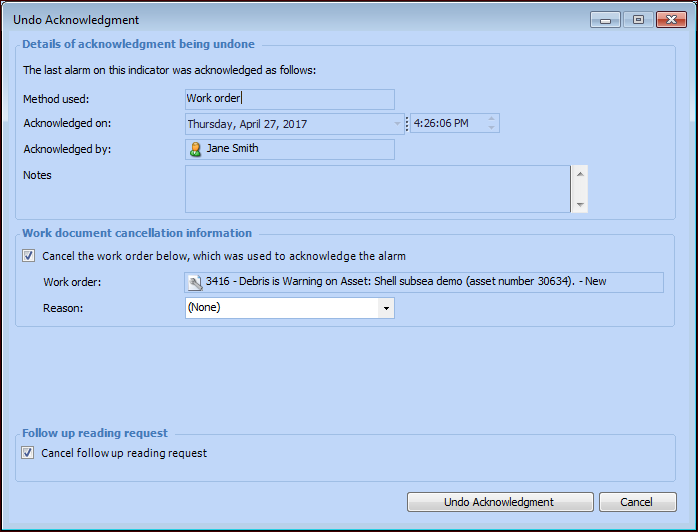
Right-click the indicator and click Undo Acknowledgment. The Undo Acknowledgment dialog appears.
3.
Note: You can only cancel work requests or work orders that are still open.
4.
5.
Click OK.

To Undo an Acknowledgment with an SAP Work Document
1.
2.
Right-click the indicator and click Undo Acknowledgment. The Undo Acknowledgment dialog appears.
3.
4.
5.
6.
7.
Click OK.