|
Inactivating a Supplier
• Supplier Resources and Prices: a warning is issued if a inactive supplier is referenced on a supplier resource.
• Resource Demands: inactive suppliers may not be selected as the preferred supplier on a resource demand or as the buyer's selected supplier. When you inactivate a supplier, if the supplier was selected as the preferred supplier on any open purchase demands, the preferred supplier selection on the demands will be cleared.
• Purchase Orders: new purchase orders or purchase order lines cannot be created for an inactive supplier. Existing purchase orders can have their life cycles completed (e.g. if the supplier has an open PO at the time that it is made inactive, the PO lines can be received)
• Blanket Orders: new blanket orders or lines cannot be created for an inactive supplier
• Blanket Releases: new releases cannot be created for an inactive supplier nor can new lines be added to an existing release.
• Requests for Quotation: inactive suppliers cannot be included on a RFQ
• Purchasing Contracts: new purchasing contracts cannot be created for an inactive supplier.
• Consignment Inventory: an inactive supplier cannot be defined as the consigning supplier for a resource. Consignment inventory cannot be issued if the consigning supplier is inactive.To Inactivate a Supplier
1. From the site select the Suppliers view.
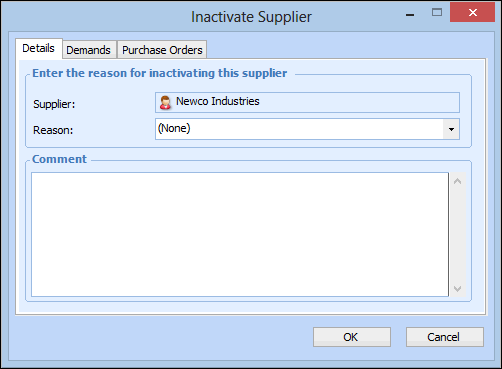
2. Right-click the supplier and select Mark as Inactive. The Inactivate Supplier dialog appears.
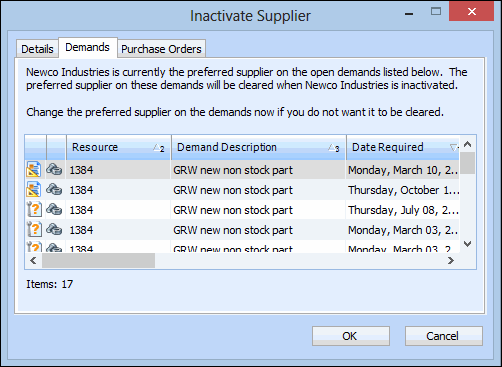
4. Select the Demands tab. This tab shows any outstanding purchase demands on which this supplier is listed as the preferred supplier.
5. If appropriate, you can select a new preferred supplier on the listed demands. Double-click a demand to open it. On the Requirement dialog, select the Purchase Details tab. Click Edit to open the Supplier box for editing. Enter the number of the new supplier, click All suppliers, or click Valid Suppliers to search for an appropriate supplier.
7.
8. Select the Purchase Orders tab to view the open purchase orders for the supplier. Any currently open purchase orders can be completed, but new ones cannot be created once the supplier is made inactive.
9. When you are finished, click OK. The system sets the supplier status to inactive.