Identifying Assets for Prioritization Analysis

The results of an asset’s prioritization analysis can be applied to its descendant assets. This approach is based on the premise that the equipment and components contained in a system are for the most part of the same priority as the system. Therefore, the analysis is performed at the system level. This reduces the effort required to perform the analysis by analyzing a smaller number of assets.
This approach does not work when an individual piece of equipment’s or component’s priority is different from that of the system. For example, if there is a built-in backup for a particular component, the back-up component’s priority might be less than that of the system. In this case, the asset can be added to the analysis and analyzed separately.
Alternatively, the results of an asset’s prioritization analysis can be applied to assets above it in the hierarchy (its ancestors) or assets on the same branch of the hierarchy (its peers).
This topic explains how to select assets to be analyzed. You can specify which of an asset’s descendants are to be analyzed separately. The descendant asset’s prioritization analysis results are seen separately from the parent’s, and the parent’s scores do not override the descendant’s scores.
Note: If you selected a primary asset on the General tab, it is automatically added to the Assets tab. You can click Browse to select from the primary asset’s descendants.

To Identify Assets for Prioritization Analysis

1.
In the Asset Analysis window, Properties view, select the Assets tab.
2.
3.
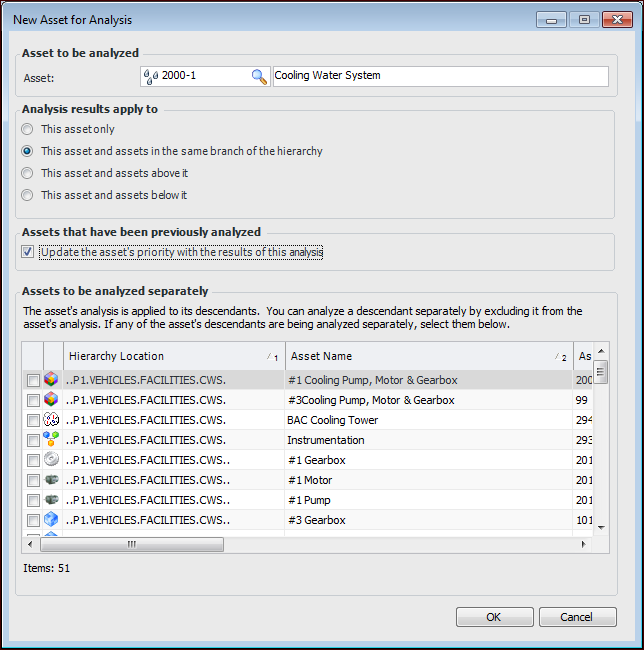
Click New. The New Asset for Analysis dialog appears.
Tip: Click Browse (instead of New) to quickly add a descendant of the primary analysis asset. The Asset Selector window appears, where you can select assets to add to the analysis.
4.
5.
The Analysis results apply to options are copied from the defaults on the analysis’ Options tab. You can change them here for the current asset.
6.
If Update the asset’s priority with the results of this analysis is selected, previously analyzed assets are updated when the results of the current analysis are applied. This option takes into account the selected Analysis results apply to option.
7.
Note: You can also perform this step after you have added the parent asset to the analysis. Double-click it in the Assets tab to open the Asset Analysis window. Select the Descendants tab, select the assets to analyze separately, and click OK.
8.
Click OK. The assets appear in the asset list of the analysis.