Viewing Mobile Checksheet Assignments

You can view the checksheet activities that were created from a standard job, standard task, or work order and assigned to mobile devices.
You can also view all of the mobile computing activities for a site. This allows you to review the status of activities assigned to employees or maintenance groups. Mobile computing activities can have any of the following statuses:

To View Mobile Computing Activities for a Site

Select the site’s Mobile Computing view and the iOS or Android Activities tab. On the Activities by Device and Activities tabs, you can view the mobile computing activities for this site only, for this site and below, or for this site and above.

To View Activities for a Mobile Device

1.
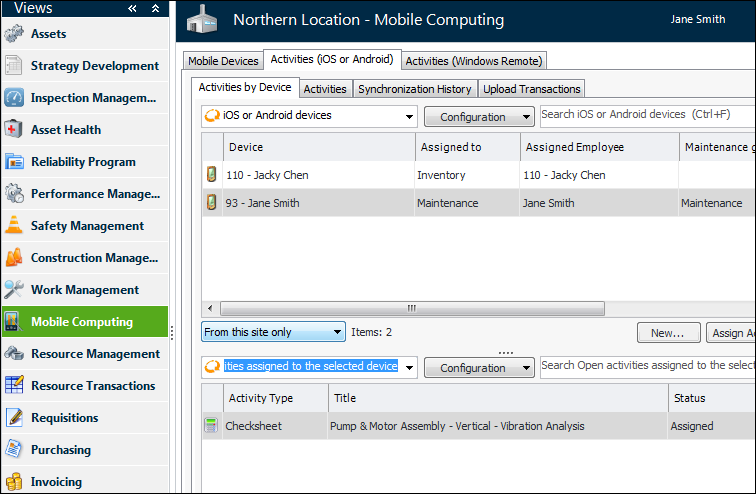
Select the site’s Mobile Computing view and the Activities (iOS or Android) tab.
2.
Select the device in the iOS or Android devices table. The activities assigned to the device are listed in the bottom table. You can choose between configurations for open and historic activities. For example:

To View Mobile Checksheet Activities for a Work Order Task

1.
2.
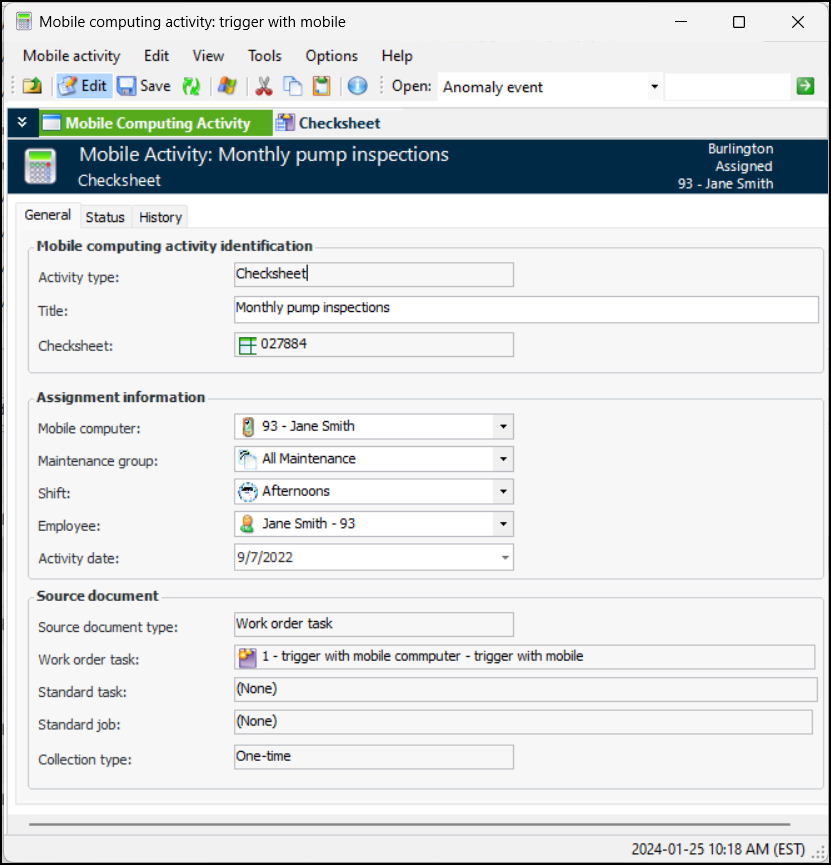
From the Tools menu, select Indicators, and then View Mobile Computing Info. The Mobile Computing Activity window appears. For example:
3.
Review the information. The Status tab shows who the activity was assigned to, its current status, when it was downloaded and uploaded, and so on.
4.

To View Checksheet Activities for a Standard Task
1.
2.
Select the Inspections view.
3.
Select the Mobile Computing tab. In the list of configurations, you can select configurations for open and closed activities based on the standard task or job.
4.