
|
Setting up Currency Combinations and Exchange Rates
You cannot add a currency combination that already exists. For information about editing the current rate, see Editing Current Exchange Rates.Once you have set up a currency combination, you can add a new rate for it as often as once per day. For information, see Adding Currency Exchange Rates.To Add a Currency Combination and Exchange Rate
1. On the Enterprise window, select the Accounting view.
2. Select the Currencies tab, then the Exchange Rates tab. This tab shows a list of all current exchange rates.
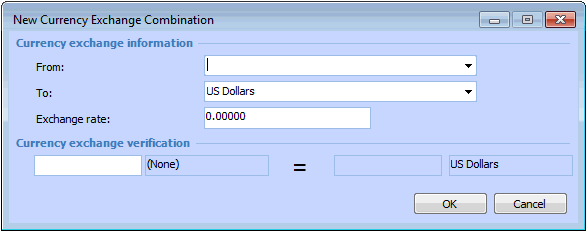
3. Click New Currency Combination. The New Currency Exchange Combination dialog appears.
4. Select the currency to be converted in the From list.
5. In the To list, select the currency to which amounts in the “from” currency are converted.
7. To verify that the rate is correct, enter a number in the Currency exchange verification box. The system converts the value to the target currency using the exchange rate.
8. Click OK to save the currency combination and rate.