Setting up Financial Periods

A financial period is an enterprise setting used to group and summarize objects such as costs and indicator readings for a period of time. Financial periods group and summarize costs by cost type. You can create financial periods for each year, quarter, or month.
APM enables you to select the start and end dates for financial periods. For example, if your department managers report their costs each month, it will make sense for you to create a financial period for each month. You can have multiple financial periods overlapping; for example, one month could be included in the yearly period, a quarterly period, and a monthly period.

Note that you must create the financial period(s) before you post costs. If you post a cost to February before you create the February monthly financial period, the posted cost will not appear in February’s total. If necessary, your implementation consultant can arrange a data conversion to ensure that all applicable costs appear in the correct places.
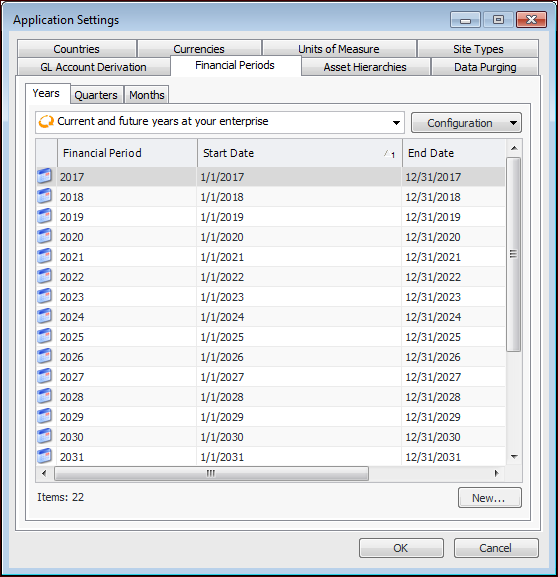
The APM Install database comes with a set of predefined financial periods covering the current year to 2038. If necessary, you can edit these financial periods or add financial periods.
Tip: When costs are entered but an appropriate financial period has not been defined, APM creates periods up to the date it is looking for. The type of period (month, quarter, year) is taken from the types already defined in accounting settings.

To Add Financial Periods

1.
From the Enterprise window, click the Administration menu, and then Application Settings. The Application Settings dialog appears. Select the Financial Periods tab.
2.
3.
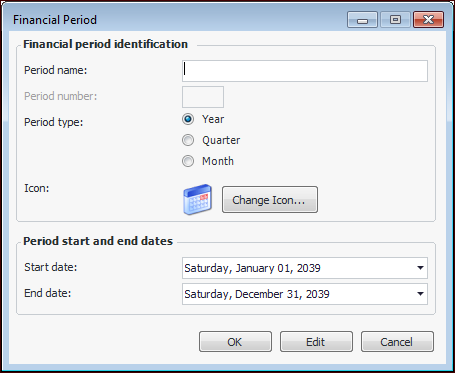
Click New. The Financial Period dialog appears.
4.
5.
Click OK to save the financial period and close the Financial Period dialog.
6.
Repeat steps 2 to 5 for each financial period that you need to enter.
7.
Click OK to close the Application Settings dialog.