Setting up Invoicing and Credit Memo Approvals

Two levels of approvals are supported for invoices: invoice approval and invoice line approval.

Invoice Approval

Invoice approval approves the invoice as a whole for payment. Typically, an invoice is approved by the person responsible for the account to which the invoice costs are charged.
Most invoices do not require approval. The costs were approved when the requisition and/or purchase order was created. However, invoice approvals can be used to:
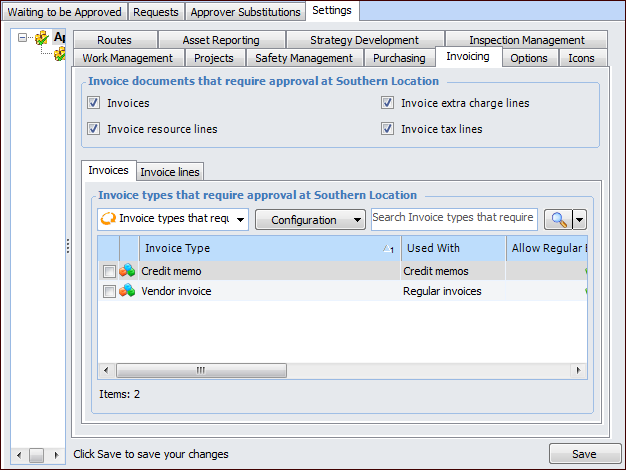
Invoice approval can be activated by invoice type. Because the invoice type defines whether the invoice is a regular invoice or credit memo, you could require that credit memos be approved, while not requiring approval for invoices.
For invoices, approval route selection is based on the GL accounts charged. The approval route’s automatic approval threshold amount is used to automatically approve low value invoices.

Invoice Line Approval

Invoice line approval is used to approve the individual lines on an invoice. Line approval is used when the invoicing clerk cannot accept an individual line because the price difference exceeds the defined tolerances. This situation requires an additional level of approval.
If an invoice line is entered and its price difference exceeds the tolerances, the following behavior occurs:
Approval route selection is based on the purchase order line’s buyer.
Approver limits are based on the value of the difference between the purchase order line and invoice line. For example, if the purchase order line value is $1,000 and the invoice line value is $1,500, the line must be approved by an approver with an approval limit of $500 (the difference between the purchase order line and the invoice line).

Invoice Line Approval for Extra Charge and Tax Lines

Invoice line approval can also be used to approve an invoice’s extra charge and tax lines. Approval for these lines works in the same way as regular invoice line approval: if the value of the line is different than the expected price and the difference exceeds the tolerances, the line must be approved.
Extra charges and taxes included on the invoice that were not identified on the invoice’s purchase order are assumed to have an expected price of zero; the extra charge or tax was not identified as being applicable for the purchase order.
Extra charge and tax lines on invoices that do not reference a purchase order do not have to be approved. Only extra charges and taxes on purchase order invoices require approval.

Using Invoice and Line Approval Together

When both invoice and invoice line approvals are being used together, the workflow is as follows:
After you enter the approval settings, to use approvals with these documents you must set up authorized employees as approvers, and create appropriate approval routes.

To Enter Invoicing Approval Settings

1.
On the site window, select the Approvals view and the Settings tab. Select the Settings in the tree.
2.
Select the Invoicing tab.
3.
Click Edit to modify the site settings. The Edit button is replaced by the Save button.
4.
5.
If invoices require approval, select the Invoices tab and select the invoice types.
6.
7.
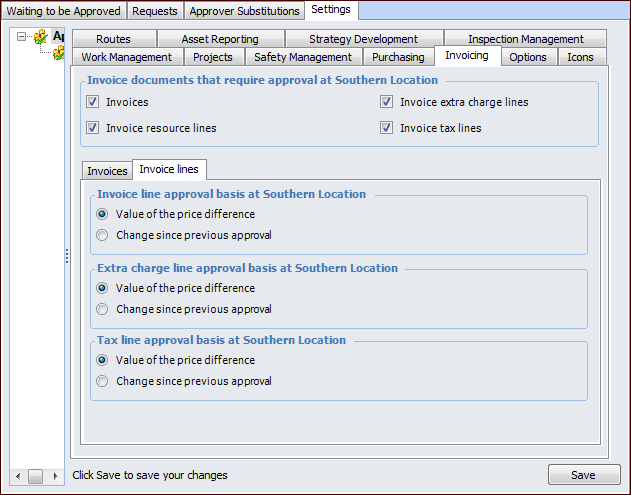
Value of the price difference – approval is based on the total value of the line
Change since previous approval – approval is based on the net change in the value of the line. For example, if the line was approved for $1000 and then redrafted and changed to $1,150, re-approval is required for the $150 difference.
8.
Click Save.