|
Selecting Default Approval Routes for a Site
This topic explains how to set the default approval routes for a site. To create approval routes, see Creating Approval Routes.
• Is appropriate for the type of document being approved (for example, work order, requisition, or safety management object)
•To Select Default Routes for a Site
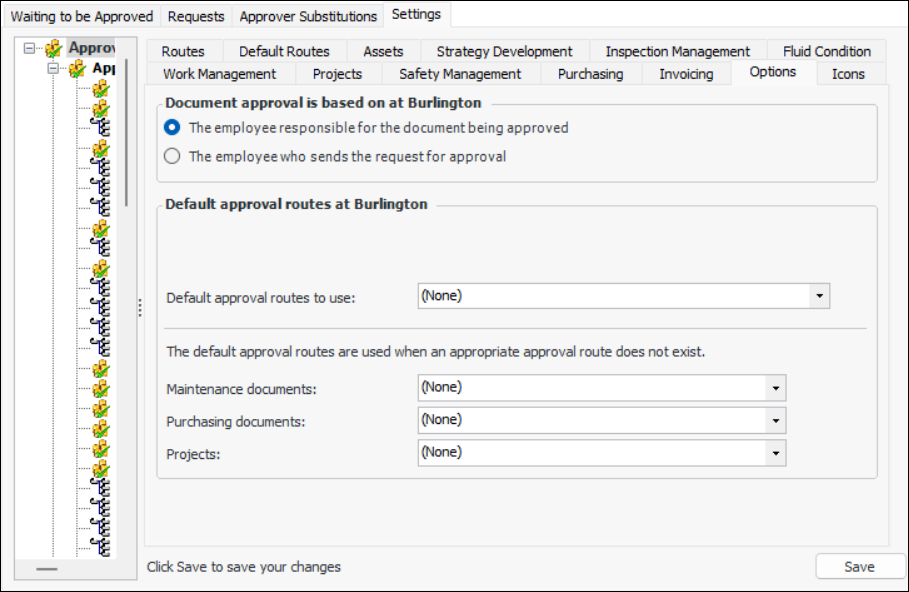
1. On the site window, select the Approvals view and the Settings tab. Select the Settings in the tree.
2. Select the Options tab.
3.
4. If default approval route sets have been enabled (feature 57), you can select a set in the Default approval routes area.
•
6. Click Save.Note: Default approval route sets are a “generally available” product feature. You must first enable feature 57 to use the functionality in APM. In the Enterprise window, select the Features view and the Enabled Features tab. Click Browse, select “Default approval route support” and click OK. If APM is running as a smart client, click Refresh Enabled Features on the server. Then restart the client to use the functionality.