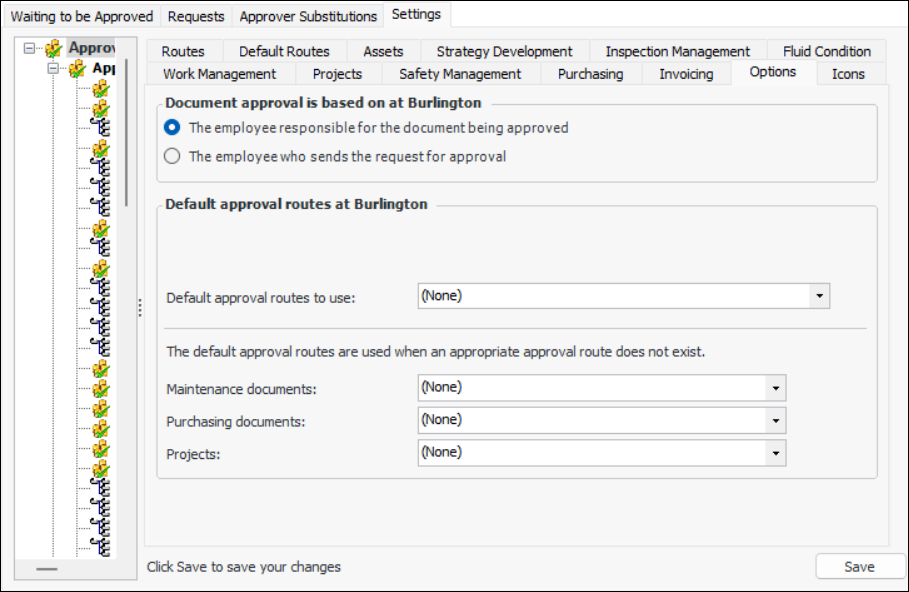
Setting the Request Originator Rule

In approval settings, you can specify who is the originator of approval requests: the employee who sends the document for approval or the employee responsible for the document being approved.
For example, consider a work order where Jane is the “requested by” employee, but Joe sends the work order for approval. If you select The employee responsible for the document being approved, Jane is considered the originator of the request. If you select The employee who sends the document for approval, Joe would be considered to be the originator of the request.
In APM, if the originator and the approver are the same person, the request is automatically approved. Otherwise, the approver must manually approve the request.
This topic explains how to set the originator rule for the site.

To Set the Request Originator Rule

1.
On the site window, select the Approvals view and the Settings tab. Select the Settings in the tree.
2.
Select the Options tab.
3.
Click Edit to modify the site settings. The Edit button is replaced by the Save button.
 
4.
The employee responsible for the document being approved: The “employee responsible for the document being approved” is determined based on the context:
Projects: Project manager
Work orders: Primary task’s Requestor. If no requestor is entered, the Planner is used.
Work requests: Requestor
Asset transfer documents: “Transferred by” employee
Requisitions: “Requested by” employee
Purchase orders: “Requested by” employee
Contracts: Buyer
Invoices: “Created by” employee
Invoice lines: “Created by” employee
5.
6.
Click Save.