**Setting up GL Account Derivation Rules

To use APM’s costing function, you must first define how GL accounts will be derived.
Note: GL account derivation rules apply to all sites in the enterprise, and cannot be overridden for individual sites.
When APM derives an account number for a transaction, it can either generate the GL account from two account segments or choose a whole account number. Account derivation is based on the accounting settings selected for the enterprise.
If you are going to interface APM with existing plant cost systems, the account numbers in the two systems must match exactly. If you are using APM alone, simply define the account numbers so that they support the level of cost analysis done by the maintenance department.
The options for deriving accounts and the related transactions are listed in the following table:

Using Whole Account Numbers

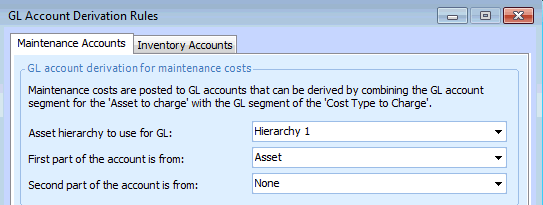
You can set up APM to use whole account numbers by entering a setting in the First part of each of the account derivation rules, and setting the Second part to “None”. For example:
With the settings shown in the previous example, you would then need to set whole account numbers as the default GL account on your assets.

Using Accounts Derived from Segments

If your organization uses account numbers that are derived from segments, APM tries to verify the derived number before completing a transaction. To verify the number, APM tries to match the account number created from the segments to a whole account number. This means that all account numbers that can be derived by the system must also exist in APM as whole account numbers.
When you post a transaction, if a derived account number cannot be matched you will be warned that the transaction can be saved but not posted. The transaction can then only be posted if the account segments are corrected, a valid whole account number is created for the derived account, or if the account number is entered manually (overridden).
When planning resource demands (for example, a labor demand on a work order), you may see the message “Account [derived account number] has been derived but does not exist”. Depending on your site’s accounting policy, you may be able to save the demand as is, or you may need to enter a valid account number before saving the demand. Transactions created for a demand without a valid derived account can only be posted if the account segments are corrected, a valid whole account number is created for the derived account, or if the account number is entered manually (overridden) on each transaction.
When a work order task is charged to an asset for which a default GL account segment is not entered, and that does not have an ancestor asset with a default GL account segment, APM issues a warning when the work order task is saved. If users choose to continue, they will need to enter the GL account number manually on each transaction.
Note: If the site has a default GL account segment, the system uses that segment when deriving the GL account number for the work order transactions.
For more information, see **Setting Site Accounting Policies, and Troubleshooting Derived GL Accounts.
Once you set up account derivation rules, only the appropriate accounts are available when you view the list of accounts to which you can post charges. For example, if you select to use whole accounts for maintenance charges, only whole accounts will be available to use on maintenance transactions.
Note: If necessary, you can allow users to override the maintenance account numbers derived by APM on each transaction. This option is set on individual work types.

Maintenance Account Derivation

There are two accounting settings that control how maintenance accounts are derived: account derivation for maintenance costs, and the offset account derivation for labor costs. These rules are set at the enterprise level and are the same for all sites.
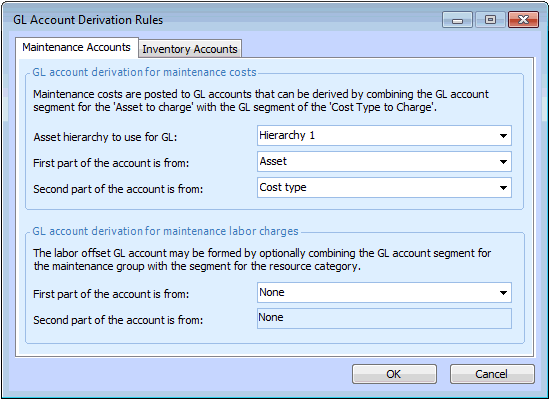
GL account derivation for maintenance costs: This setting controls how maintenance accounts are derived for resource transactions when the cost is charged either to a work order task or directly to an asset. You can use any of the following for maintenance accounts:
Materials, tools, and services derive their cost type from the resource category they are part of. Trades derive their cost type from the labor rate type used on the timecard.
For example, you could choose to combine segments using Asset for the first part, and Cost type for the second part. If a user creates transactions on a work order charged to asset Cooling Water Pump 3761, the accounts are derived as follows:
Material: Regulator
Resource category: Valves - Control
Cost type: Materials
Trade: Electrician
Labor rate type: Labor regular
Cost type: Regular
 
GL account derivation for labor charges: This setting controls how the offset account is derived for timecards. If you will be transferring APM generated transactions to your general ledger system, it is a good idea to set up labor offset accounts. You can use any of the following for labor offset accounts:
If you set both the first and second parts to “None”, APM will not record an offset account for timecards.
Note: If you use the maintenance group account segment, you must either add each employee to a maintenance group or select a maintenance group when you enter each timecard.
For example, you could choose to combine segments using Maintenance Group for the first part, and Category for the second part. If a user in the Electrical maintenance group creates a timecard for the Electrician trade, the labor offset account is derived as follows:
Trade: Electrician
To set up derivation for maintenance accounts, see To Set up Account Derivations.

Inventory Account Derivation

There are two accounting settings that control how inventory offset accounts are derived: inventory offset account derivation, and the resource-specific offset account derivation for inventory. These settings are entered at the enterprise level and are the same for all sites.
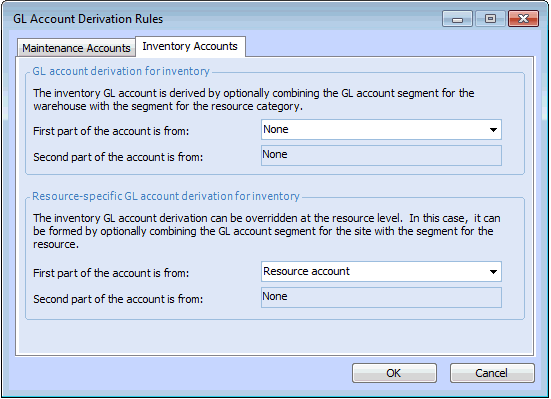
GL account derivation for inventory: this setting controls how inventory offset accounts are derived. You can use any of the following for inventory offset accounts:
If you choose “None” for both of these settings, APM will not record an offset account on inventory transactions.
For example, you could choose to combine segments using Warehouse for the first part, and Category for the second part. If a user creates a material issue from Warehouse 1, the offset account is derived as follows:
Material: Regulator
Resource category: Valves - Control
 
Resource-specific GL account derivation for inventory: this setting controls whether users can override the derived inventory offset account on individual resources (GL Account Derivation tab, Inventory Accounts tab). When the derived account is overridden, users can select:
If the first part is set to “None”, the offset account cannot be overridden on resources.
For example, you could choose to combine segments using Site account segment for the first part, and Resource account segment for the second part. If a user creates a material issue for a resource with an override, the inventory offset account is derived as follows:
Material: Regulator

To Set up Account Derivations

1.
2.
From the Accounting view, select GL Accounts tab. This tab shows a list of all GL account numbers and segments entered in APM.
3.
4.
Select the Maintenance Accounts tab.
5.
Enter the appropriate settings in the GL account derivation for maintenance costs area:
To use whole accounts instead of segments, select either Asset or Cost type for the First part of the account, and set the Second part of the account to None.
6.
Enter the appropriate settings in the GL account derivation for maintenance labor charges area:
7.
Select the Inventory Accounts tab.
8.
If the Second part of the account is set to None, you must use whole account numbers for either the warehouse or resource category accounts.
If the First part of the account is set to Resource Account (which is a whole account number), the Second part is automatically set to None.
Note: If you select Site account segment for the resource account derivation, you must select an inventory account segment for each site in the site’s Properties dialog. The current list of site segments is displayed on the Inventory tab. For more information, see Selecting Site and Special Accounts.
9.
Click OK to close the GL Account Derivation Rules dialog.