
Updating Failure Settings on Indicator States

When failure tracking is turned on for an asset’s indicator alarm states, APM creates a failure record automatically whenever an alarm is acknowledged with the appropriate option. When you upgraded APM to a version that supports failure tracking, the following default values were applied to your existing indicator states:
Create a failure is turned on. A failure is created for all states other than the indicator’s normal state.
Failure severity is set to null. A failure severity is not defaulted to the indicator states.
Using the mass update utility that APM provides, you can change the failure settings for any asset and, if you wish, its descendants. You can also change individual indicator’s failure settings. For each alarm type, you can do the following:
Tip: You can view the history of the indicator state updates on the asset’s Utilities view. Select the Indicator States - Mass Updates tab.
This topic explains how to use the mass update utility to change failure settings for all of an asset’s indicators. For information about changing an individual indicator’s states, see Adding States and Alarms to an Indicator or Template.

To Update Failure Settings on Indicator States
1.
2.
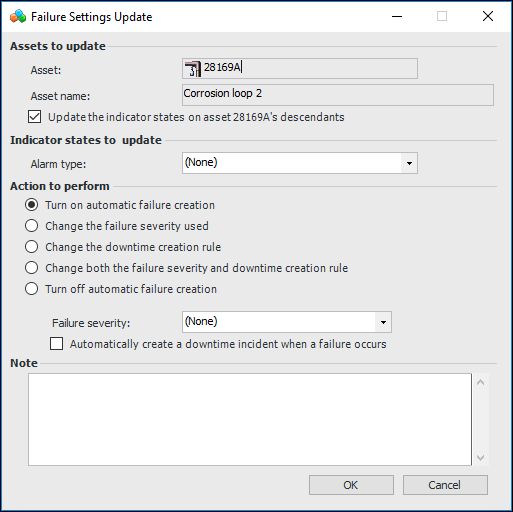
From the Tools menu, select Inspection Management and then Update State Failure Settings. The Failure Settings Update dialog appears.
3.
To update the asset’s descendants, select Update the indicator states on asset descendants.
4.
5.
Turn on automatic failure creation: If failure creation has been turned off, select this option to turn it on again. When you acknowledge an indicator reading with the specified alarm type, a failure record is created automatically.
Change the failure severity used: Select this option to change the default severity on generated failure records. Select a value from the Failure severity list. When you select this option, you can also set the failure severity and select whether or not to create a downtime incident at the same time.
Change the downtime creation rule: Select this option to change whether or not a downtime incident is generated when a failure record is automatically created. Then select or clear Automatically create a downtime incident when a failure occurs.
Change both the failure severity and downtime creation rule: Select this option to update the indicator states with changes to both the options. Select a value from the Failure severity list and select or clear Automatically create a downtime incident when a failure occurs.
Turn off automatic failure creation: Select this option to prevent failure records from being generated automatically.
6.
7.
Click OK to initiate the updates. Depending on the number of indicator states being updated, this process could take a few minutes to complete.