Marking Failure Records for Update

APM normally keeps track of the failure records that need to be recalculated. Rarely, if at all, you might need to mark failure records to be updated as a result of a problem with APM or your data. Failure records that have been marked for update can have their statistics recalculated manually or by scheduled actions.
Tip: You can view a history of the failure records flagged for update on the asset’s Utilities view. Select the Mark Failures For Update Requests tab.

To Mark Failure Records for Update

1.
2.
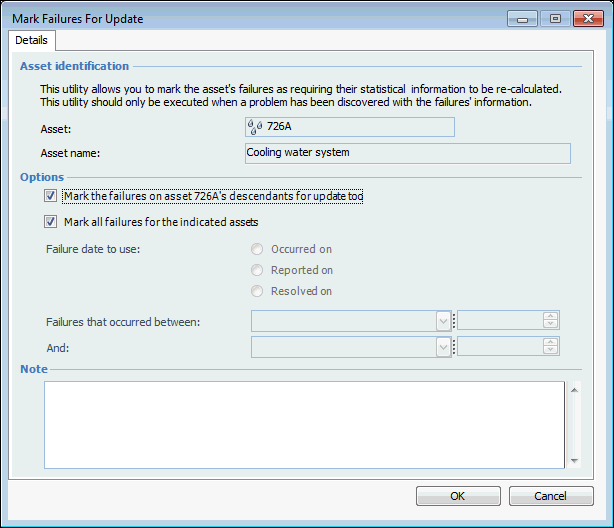
Select the Tools menu, Failures, and then Mark for Update. The Mark Failures for Update dialog appears.
3.
To mark all of the failure records on the asset’s descendants, select Mark the failures on asset’s descendents for update too.
4.
To mark all failure records, select Mark all failures for the indicated assets. Clear this option to select failures by date.
To mark failure records that occurred within a specific time period, select Occurred on and select the start and end dates for the period.
To mark failure records that were reported within a specific time period, select Reported on and select the start and end dates for the period.
To mark failure records that were resolved within a specific time period, select Resolved on and select the start and end dates for the period.
Tip: If you are uncertain about which failure records need to be recalculated, update all failures or enter a date range that safely covers the time period during which the problems occurred. Updating a failure record that does not require recalculation is harmless, but the update process may take longer to execute.
5.
6.
Click OK. The failures are marked to be updated the next time that the Calculate Failure Statistics action is run manually or by a scheduled action.