Adding Delays to Failure Records

A delay on a failure record represents a period in the restoration time that was not spent on the repair of the asset. Delays can occur for a number of reasons. For example, delays might be needed to notify maintenance that a problem has occurred, schedule the maintenance job, get the appropriate personnel to the job site, deliver parts, or return the asset to service after the repairs are complete.
Either maintenance or operations is identified as responsible for each delay reported against a failure, based on the selected delay reason. The duration of the delay is also recorded. The information is used to calculate the total delay time associated with the failure resolution, the total maintenance delay time, and the total operation delay time. These values are then used in the calculation of the Maintenance Time and Repair Time statistics.

To Add a Delay to a Failure Record

1.
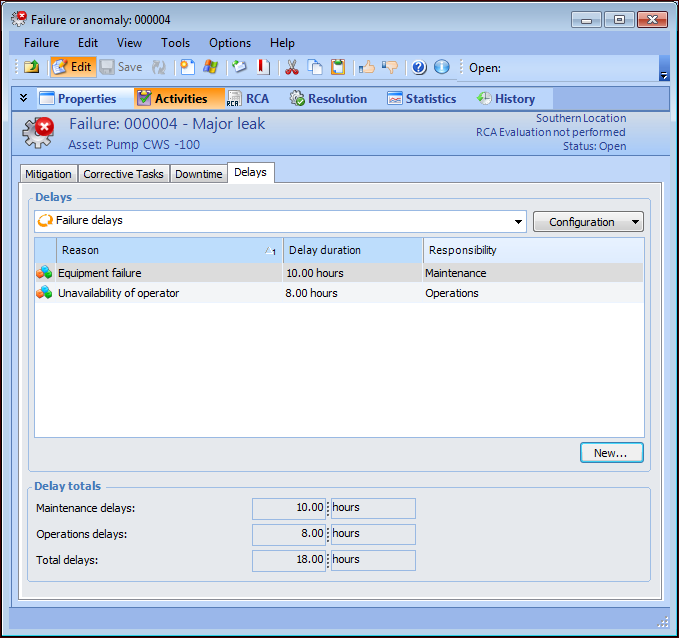
Open the Failure or Anomaly window. On the Activities view, select the Delays tab. For example:
This tab lists the failure’s delays, the sum of the maintenance and operations delays, and the total of both. If the delays are recorded in different units of time, the totals are shown in hours.
2.
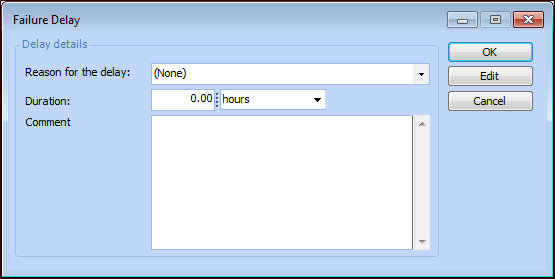
Click New. The Failure Delay dialog appears.
3.
4.
In the Duration boxes, enter a value and unit of measure for the delay time.
5.
6.
Click OK. The delay is added to the list and the totals change accordingly.