
Creating a Failure when Acknowledging an Alarm

When failure tracking is set up in your APM environment, you can create or link to failure records when acknowledging an indicator alarm with one of these methods:
Request for work is available instead of APM work documents when APM uses AssetWise Enterprise Interoperability (AWEIS) to exchange data with an external CMMS. The site’s interoperability profile specifies whether APM or interop documents are in use. For more information, see Creating a Failure to Acknowledge an Alarm with AWEIS.
SAP work documents are available instead of APM work documents when CMMS interoperability is enabled for the SAP Plant Maintenance system. The site’s interoperability profile specifies whether APM or CMMS documents are in use.
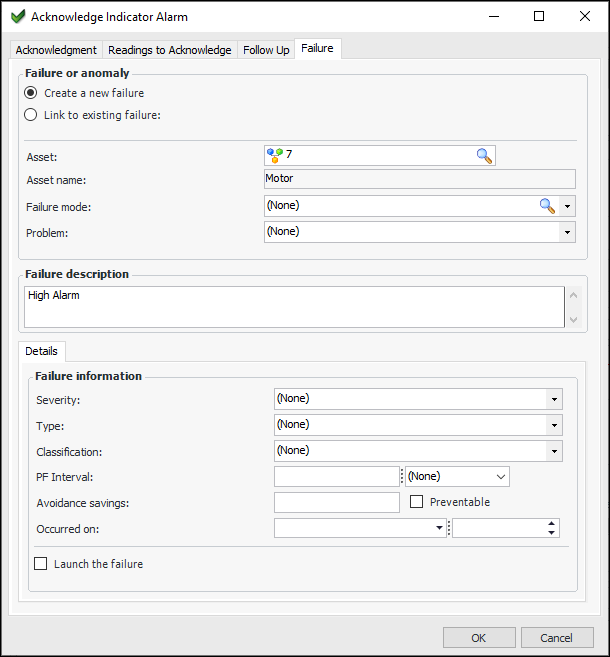
In the Acknowledge Indicator Alarm dialog, the Failure tab is available when the Create or link to a failure and anomaly option is selected on the Acknowledgment tab. This option is selected by default when the site’s indicator state default settings and the indicator state settings specify that failure records be created for alarm acknowledgments. You can change the default values when creating the acknowledgment.
The failure record is created for the indicator’s asset. The source of the failure is defined as Indicator alarm acknowledgment. The status of the failure is Open unless the alarm is acknowledged as “fixed during inspection”.
If the problem was fixed during inspection, the failure’s status is Resolved. The Resolved on and Returned to service on dates are set to the date and time that the alarm was acknowledged. The Resolved by value is the employee who acknowledged the alarm. The resolution description is populated with the collector’s note from the indicator reading.
Note: After saving a failure record, you must use the Change buttons or the commands on the Tools menu if you wish to change the following information: asset information, failure dates, severity level, PF interval. You cannot simply enable editing to change this information because the failure statistics for all affected assets might require recalculation. For more information, see Editing Failure Records.
This topic explains how to create a failure record when acknowledging an alarm.

To Create a Failure When Acknowledging an Alarm
1.
On the Acknowledge Indicator Alarm dialog, Acknowledgment tab, select one of the following methods, as appropriate:
Work order or Maintenance order
Work request or Notification
2.
Ensure that Create or link to a failure and anomaly is selected.
For information about completing the Acknowledgment tab, see either:
3.
Select the Failure tab.
4.
Select either Create a new failure or Link to existing failure.
5.
If you selected Link to existing failure, browse to select a failure from the Failure Selector dialog and then skip to step 14.
6.
If problems have been defined for the asset type, select a suitable problem from the Problem list. The selected problem’s description, failure type, and failure classification are copied to the failure record.
7.
The Failure description box contains the indicator state’s name. You can change and add information to the description.
8.
Total: the asset’s performance has decreased to a point where the asset no longer performs at its required level. The asset has completely failed.
Partial: the asset’s performance has decreased to a point where it no longer performs one of its functions at the specified levels. The asset is still functioning.
Potential: a condition has been noticed that would result in a failure if the problem is not resolved. Potential failures are most often reported when an indicator reading raises an alarm against the asset.
9.
Select Preventable if you wish to indicate that the asset’s reliability program needs review.
10.
11.
The default PF interval is based on the settings of the indicator state and alarm type. For example, it can be copied from the selected failure mode, specified on the indicator state, or calculated based on the alarm type’s rule. The default value can be adjusted to reflect your best guess for the time that elapsed from when the failure started to be noticeable to the time when the reading was taken.
For example, an indicator state has a PF interval of four months (120 days). The indicator is read at a frequency of every 60 days. When a failure is created from the indicator and state, the PF interval on the failure is prompted with a value of four months. Because the reading value indicates that the failure started to occur 20 days ago, you could manually adjust the PF interval to 100 days.
12.
13.
14.
15.
Click OK. APM closes the dialog, creates the work document (if selected), creates the failure record, and turns off the warning or alarm on the indicator.
A downtime incident is also created if the indicator state’s failure settings specify it. You can select the asset’s Performance Management view, Downtime tab to review the incident.
When tracking a failure record, you can also perform the following tasks: