|
Requesting Follow-up Work for a Work Order Task
Tip: To view the follow-up work requests and work orders that have been created for the work order task, select the task’s Activity view and Follow-up tab.To Request Follow-up Work
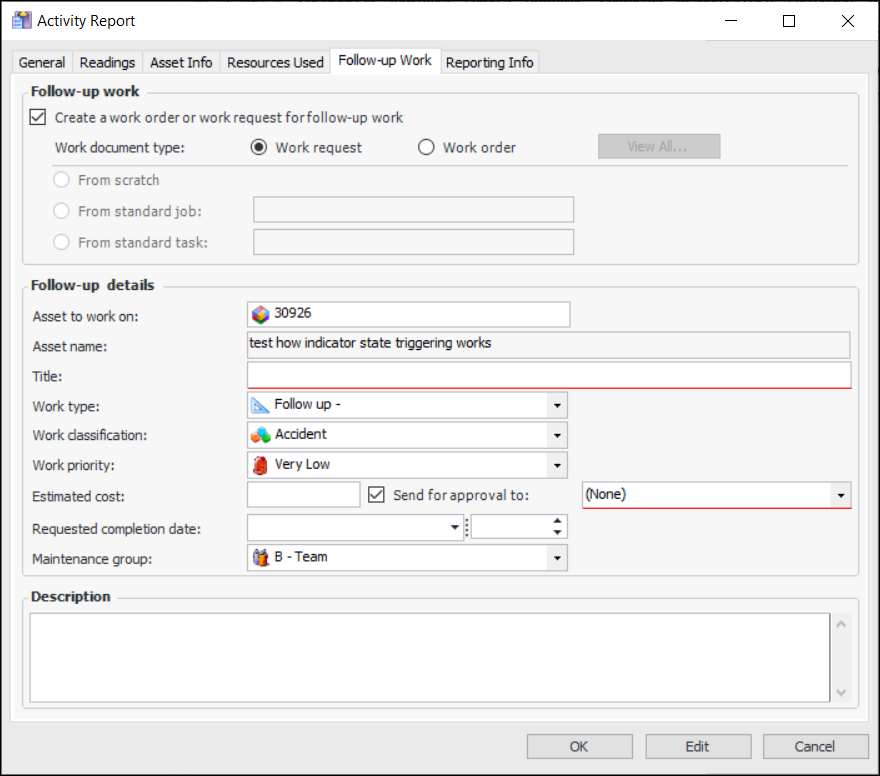
3. Select the Follow-up Work tab.
4. Click Create a work order or work request for follow-up work.
6. If you selected Work order, select the method for creating the document. The options are:
• From scratch – Add a new work order. See step 7.
• From standard job – Browse to select the appropriate standard job. Select the requested completion date
• From standard task – Browse to select the appropriate standard task. Select the requested completion date
• If the site settings specify that work documents must be approved, Send for approval to is selected by default. Select the approval route
8. Click OK. The Activity Report dialog closes. The document is created when the report is processed.