Defining Recurrence Patterns

You can use recurrence patterns (also called “scheduling frequencies” and “calculation frequencies”) to specify the intervals at which certain activities should be repeated. For example, you might need to define how often a performance indicator should be recalculated (perhaps every hour, on the 15th of every month, every Wednesday and Tuesday at 10:00) or set up a scheduled action to run a method (for example, processing activity reports) at a set period every day.
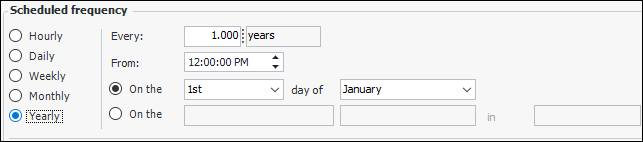
When you work with an object that uses a recurrence pattern, you will see a section of the screen that looks like this:
This topic explains how to define each type of pattern: hourly, daily, weekly, monthly, and yearly.

Site Time Zones, Recurrence Patterns, and Daylight Saving Time

When a scheduled action applies to a specific site, the recurrence pattern uses the site’s time zone. For example, if Site B’s time zone is Eastern Standard Time (EST) and the pattern is “every day at 7:00 AM”, the action will run every day at 7 AM EST.
When an action applies to all sites, the top site’s time zone is used. So, if the top site is in Halifax (Atlantic Standard Time - AST), the action will run every day at 7 AM AST, which is 6:00 AM EST for Site B.
If your sites have different time zones, we recommend scheduling KPI calculations on an individual site basis.
Note: If the start or end of daylight saving time prevents a task from being launched at its scheduled time, the task will automatically run as soon as possible after the scheduled task is missed.

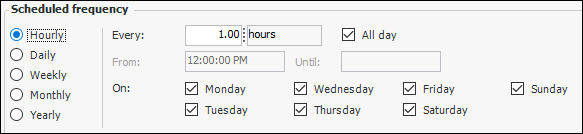
To Define an Hourly Pattern

1.
Select Hourly to define a pattern that repeats more than once a day (for example, every two hours, every half hour, and so on).
2.
3.
If the pattern will repeat all day long, select All day (selected by default). “All day” means the pattern will repeat from midnight to midnight.
4.

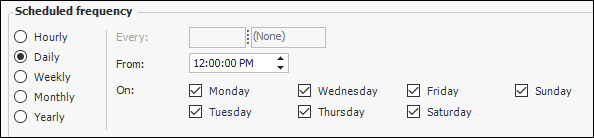
To Define a Daily Pattern

1.
Select Daily to define a pattern that repeats more than once a week (for example, every day at 10 a.m. or every Monday, Wednesday, and Friday at 10 a.m.).
2.
3.

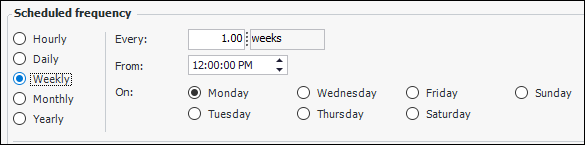
To Define a Weekly Pattern

1.
Select Weekly to define a pattern that repeats at weekly intervals but not more than once a week (for example, every week on Tuesday at 10 a.m. or every two weeks on Saturday at 10 a.m.).
2.
3.
4.

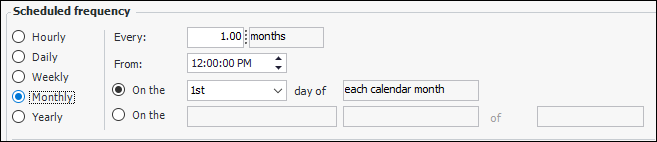
To Define a Monthly Pattern

1.
Select Monthly to define a pattern that repeats in monthly intervals but not more than once a month (for example, every month on the 15th at 10 a.m. or every two months on the first Monday at 10 a.m.). You can choose the calendar or financial month.
2.
Note: The Action Scheduler monthly recurrence pattern only supports recurrences of every 1, 2, 3, 4, or 6 months.
3.
4.
If you want the pattern to repeat on a specific date each month, select the first On the option and specify the day of the month on which you would like the event to occur (for example, on the 15th day of each month). You can select any day from the 1st to the 31st. If you want the pattern to occur on the last day of every month, then select the Last choice from the list.
Note: A monthly task scheduled for the last day of the month is only supported on Windows Vista/Server 2008 and newer. On earlier versions of the operating system, the task will be scheduled for the first day of the month.
Specify whether to use the calendar or financial month.
If you want the pattern to repeat on a relative day each month (for example, the first Monday of the month), then select the second On the option. Specify the week of the month on which you want the pattern to occur. Your choices are 1st, 2nd, 3rd, 4th, and Last.
You must also select the day of the week on which the event occurs (that is, Monday through Sunday).
Specify whether to use the calendar or financial month.

To Define a Yearly Pattern

1.
Select Yearly to define a pattern that repeats in yearly intervals but not more than once a year (for example, every year on the 1st of July at 10 a.m. or every year on the last day in December at 10 a.m.).
2.
3.
4.
If you want the event to repeat on a specific day of a specific month, then select the first On the option and the day and month. You can select any day from the 1st to the 31st. If you want the pattern to occur on the last day of the month, select Last.
If you want the pattern to repeat on a relative day each year (for example, the first Monday in July), then select the second On the option. Specify the week on which you want the pattern to occur (1st, 2nd, 3rd, 4th, or Last), followed by the day of the week and the month.