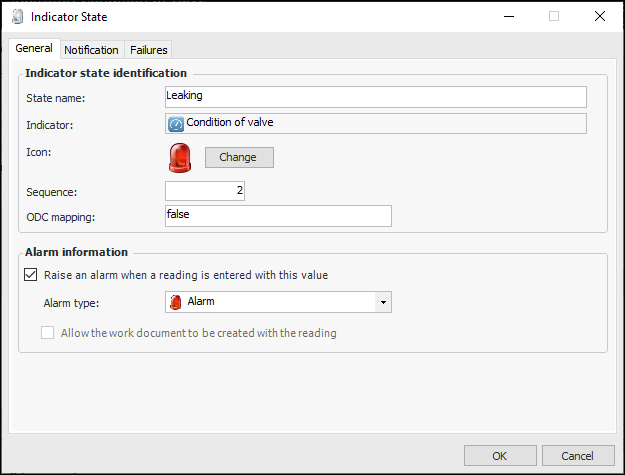
Concepts Tasks Settings Mapping Values For Descriptive Indicators You can use a descriptive indicator to collect readings that come from a source with a fixed list of values. For example, the only three possible states of an indicator that tracks the condition of a valve might be: • Normal • Leaking • Seized For a descriptive indicator collected from an online source, the data source returns distinct codes that must be mapped to each of the indicator’s possible values (states). The online indicator’s codes might be expressed as numbers, strings, or some other data type, such as a boolean. In the valve condition example, the online indicator might return: • 1 (if the valve is normal) • 2 (if it is leaking) • 3 (if it is seized) At run-time, as readings come in from the online device, the reading value will be converted to a string. This string will be compared to the mapping value for each of the states defined for the corresponding descriptive indicator in APM. When a valid match is found, an indicator reading is created with the correct descriptive state. The following shows descriptive indicator state with an ODC mapping value: Incorrect Readings If no match can be made, a reading will still be created, but it will be marked as incorrect. This situation might occur for example, if the online source returns a value for which you did not define an indicator state, or if one of the matching strings was entered incorrectly. When an incorrect reading is created due to the lack of a matching state, APM records the reason that it was marked as incorrect as “No matching state found for value collected online”. The collector’s note for the reading contains the value that was returned from the online source. Incorrect readings from online data sources are treated by the system in the same way as other incorrect readings. Data Types When you collect online data for a descriptive indicator, you must enter a mapping value for each descriptive indicator value (state). The mapping value is a string. However, the reading values from online data sources can be in the form of several different data types, depending on the online device that is emitting the readings. When defining mapping values, you must know the type of value that the online device will provide, as well as the string format to use to represent this value. The following table lists the possible data types that various online data sources might use and explains how to convert them to a string. Data Type Possible Values String Format Byte 0 to 255 0 to 255 Boolean True or False True, False Case-sensitive Not translatable Integer -32,768 to 32,767 No commas Long -2,147,483,648 to 2,147,483,647 No commas Single -3.402823E38 to -1.401298E-45 for negative values; 1.401298E-45 to 3.402823E38 for positive values No commas Double -1.79769313486231E308 to -4.94065645841247E-324 for negative values; 4.94065645841247E-324 to 1.79769313486232E308 for positive values No commas. Decimal point must respect Windows cultural settings Currency -922,337,203,685,477.5808 to 922,337,203,685,477.5807 No commas. Decimal point must respect Windows cultural settings Decimal +/-79,228,162,514,264,337,593,543,950,335 with no decimal point; +/-7.9228162514264337593543950335 with 28 places to the right of the decimal; smallest non-zero number is +/-0.0000000000000000000000000001 No commas. Decimal point must respect Windows cultural settings