Data Types

Data types enable you to specify the type of information you want to collect with an attribute.

Contents

Base Currency Amount
Binary Object
Boolean
Currency Amount
Currency Type
Date
Date and Time
Duration
Enumerated
File Name
Float Magnitude
HTML Text
Icon
Integer Magnitude
Invalid Data
Price
Quantity
String
Time
Unit of Measure
Variable Length String

Base Currency Amount

There are two currency amount data types: Base Currency Amount and Currency Amount. Both types have a Float Magnitude component (the amount) and a Currency Type component (the currency). You should use Base Currency Amount whenever the amount is always expressed in your site’s base currency. Use Currency Amount when the amount may be expressed in a currency other than the base currency.
For example, if your site is located in the United States, the base currency will be U.S. Dollar. Any attribute given this data type will always show with a currency of U.S. Dollar. If you have some suppliers in other countries, you would use the Currency Amount data type to record prices in the supplier’s currency, and Base Currency Amount to state the price converted to your site’s base currency.

Representation in UI

The control for this data type shows the amount with the abbreviation for the currency type. You cannot change the currency.
TOP

Binary Object

This data type is also known as a BLOB. Binary objects display text or graphics of varying size. Information captured in binary objects cannot be printed on reports. HTML text fields provide the same ability to display text and graphics, plus they can be printed on reports. We recommend that you use HTML text fields instead of binary objects whenever possible.

Representation in UI

Binary objects use a Rich Text Edit control style.
TOP

Boolean

A boolean data type is used when the attribute has only two possible values: True or False, Yes or No.

Representation in UI
This attribute can be represented in the user interface as a Checkbox control or a Radio Button group.
TOP

Currency Amount

The Currency Amount data type has a Float Magnitude component (the amount) and a Currency Type component (the currency type). You should use this data type when the amount may be expressed in any currency. If the amount will always be expressed in the site’s base currency, use the Base Currency Amount data type.

Representation in UI

The currency type abbreviation and the amount appear within one control.
TOP

Currency Type

This data type is used when the attribute is a type of currency, such as U.S. Dollar, Mexican Peso, and so on.

Representation in UI

It will always use a dropdown list control style in the UI.
TOP

Date

This data type is used when an attribute is a calendar date.

Representation in UI

The Date control style allows entry of a date in various m/d/y formats (for example, 11/8/06, Nov. 8, 2006, or November 8, 2006). The control includes a browse feature that will open a calendar where you can select the appropriate date.
Tip: If you are adding this attribute to a custom class, you can set the default to the current date by typing the word “Today” in the attribute’s Default Value box.
TOP

Date and Time

This data type is used when you want the attribute to record both a date and a time.

Representation in UI

The control is a combination of the Date control and the Time control.
Tip: If you are adding this attribute to a custom class, you can set the default to the current date and time by typing the word “Now” in the attribute’s Default Value box.
TOP

Duration

Duration has two components: a Float Magnitude value and a time Unit of Measure.

Representation in UI

The Duration control provides separate components for the float value and the time unit of measure.
TOP

Enumerated

An Enumerated data type enables you to select from an enumerated value list, which must be defined first.

Representation in UI

Enumerated data types can be represented as a radio button group or as a dropdown list.
TOP

File Name

The File Name data type is used for an attribute that is an HTML file and directory path.

Representation in UI

This attribute is typically represented in the UI using two styles: File and URL. The File style uses a control that accepts the input of a path to a file name. The URL control is used to display the HTML page.
TOP

Float Magnitude

This data type is used for attributes that have a numeric value with decimal precision.

Representation in UI

A Float data type uses a simple control that accepts numeric values, including a decimal point and commas.
TOP

HTML Text

The HTML Text attribute displays text of varying length. It can be printed on reports.

Representation in UI

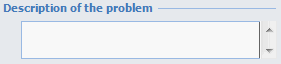
The HTML text control allows the user to enter text.
TOP

Icon

This data type is used for attributes that represent an icon.

Representation in UI

A special Icon control is used. This control enables you to select an icon from a resource file that comes with APM.
TOP

Integer Magnitude

This data type is used for attributes that have an integer value.

Representation in UI

This control style accepts input of a numeric value, including commas.
TOP

Invalid Data

TOP

Price

This data type is comprised of three components: a Currency Type, a Float Magnitude value, and a Unit of Measure.

Representation in UI

The Price control has two separate components. The first component contains the currency value, made up of the currency type and float value. The second component is the unit of measure.
TOP

Quantity

The Quantity data type has two components: a Float Magnitude value and a Unit of Measure.

Representation in UI

The Quantity control has two separate components. The first component is the float value, and the second component is the unit of measure.
TOP

String

This data type is used for attributes that allow the entry of any alphanumeric character.

Representation in UI

The text control accepts input of any alphanumeric character, limited by the length you indicate when you create the attribute.
TOP

Time

This data type is used for attributes that are time-based values.

Representation in UI

The Time control enables you to enter a time or use the spin control on the right to scroll to the correct time.
TOP

Unit of Measure

This data type is used when the attribute is a unit of measure defined in APM.

Representation in UI

The unit of measure control is represented as a dropdown list of units of measure defined in APM.
TOP

Variable Length String

This data type is used when a text string is required, but the length of the string value is unlimited.

Representation in UI

This control accepts input of alphanumeric characters. Since it can contain large amounts of text, it is typically set to stretch horizontally and/or vertically as the window is resized.
TOP